
ヘルプ
機関車
機関車は、RailKernelがコマンドステーションを通じて個別に指令する、アドレスを持つ動力車です。
RailKernelとコマンドステーションの機関車
コマンドステーションは、内部ID、プロトコル、デコーダーアドレス、速度段、ファンクションなど走行に必要な情報を持ちます。RailKernelはその運転IDを取り込み、所有するコマンドステーション、メーカー、製品番号、物理長、機関車種類、ファンクションテンプレート、画像、コメントなど上位のプロジェクト情報を追加します。そのため機関車はプロジェクトより先にCSに存在できます。インポートはRailKernel定義を作るだけで、デコーダーを複製・再登録しません。CSへの書込みをサポートする場合、アップロードとCSデータベース保守はこの編集画面ではなく「コマンドステーション」から行います。
機関車をインポートする
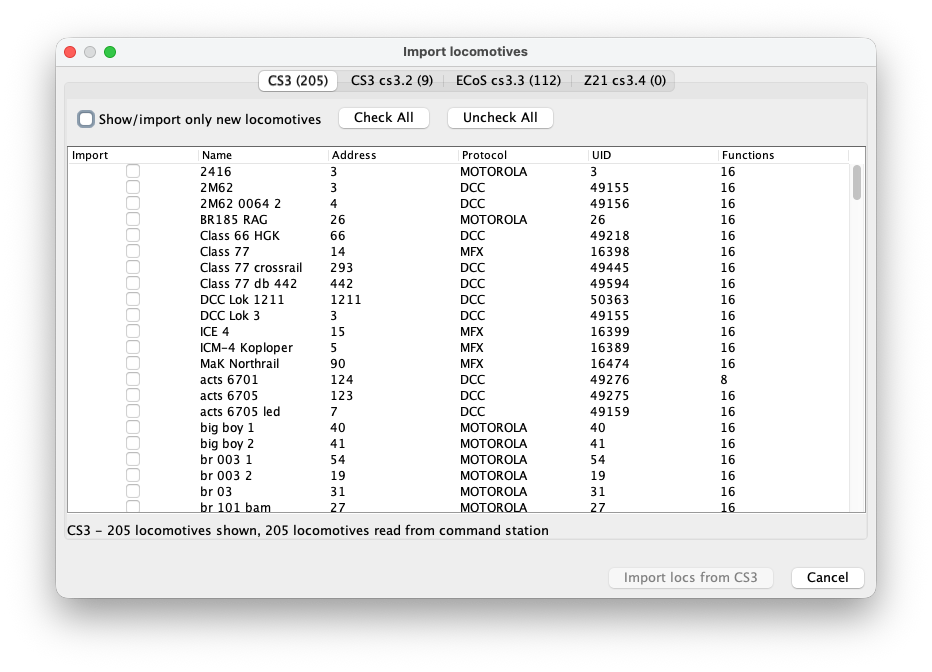
メニューから機関車インポートを開きます。RailKernelは接続中の各コマンドステーションから機関車一覧を読み、ステーション別タブを作ります。表にはインポート選択、名前、アドレス、プロトコル、UID、ファンクション数を表示します。タブ見出しと下部には読込み件数と表示件数が出ます。
インポート対象を選ぶ
このプロジェクトに必要な機関車だけを個別チェックできます。「すべて選択」は表示中のインポート可能な全行を選び、「すべて解除」は外します。「新しい機関車だけ表示/インポート」はRailKernelが既に認識する項目を隠します。CS全体と比較するときは解除してください。既存のアドレス/プロトコル組合せや通常の機関車ではない重連記録は重複から保護されます。選択CSのインポートボタンを押し、複数ステーションの場合は他のタブでも繰り返します。
機関車マネージャー
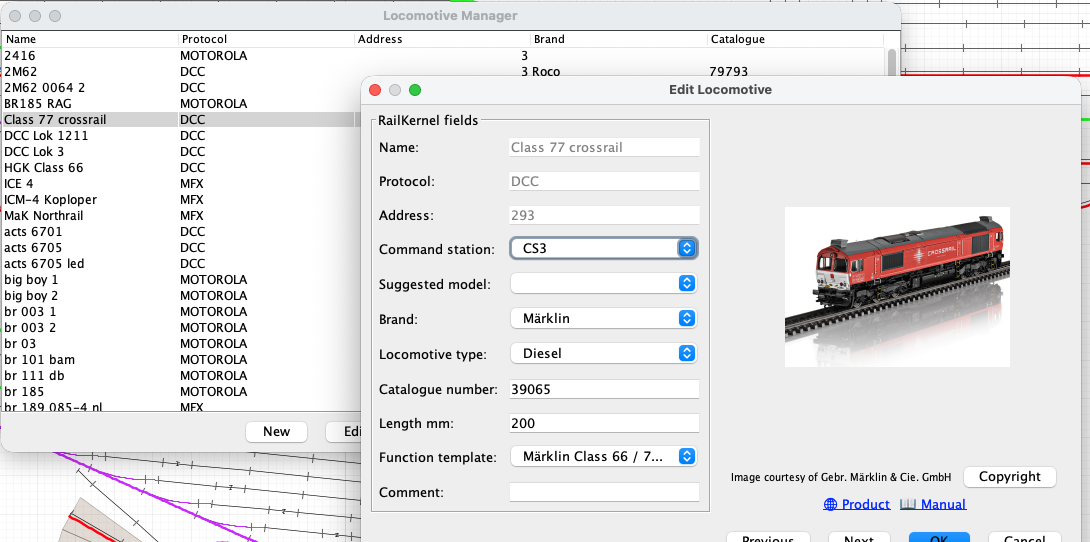
メニューから「機関車」を開くとプロジェクト一覧を表示します。表は並べ替えと絞込みができ、運転ID、ブランド、製品情報を表示します。「新規」は手動作成、「編集」は定義編集、「制御」は直接運転、「削除」は選択したプロジェクト定義を削除します。編集画面の「前へ」「次へ」で一覧に戻らず順番に確認できます。
機関車の詳細
- 名前
- RailKernel全体で使うCSまたはプロジェクト名です。インポート済み機関車では運転IDとして読取り専用です。意味のある名前はモデル候補検索にも役立ちます。
- プロトコル
- DCC、MFX、Motorolaなどのデコーダープロトコルです。アドレス、コマンドステーションと共に走行・ファンクションコマンドの送信方法を決めます。
- アドレス
- 選択したコマンドステーションが使うデコーダーアドレスです。インポートした値はCS由来であり、RailKernelメタデータ編集だけで不用意に書き換えません。
- コマンドステーション
- この機関車を担当する設定済みステーションです。速度、方向、ファンクションの全コマンドをこの接続へ送ります。
- モデル候補
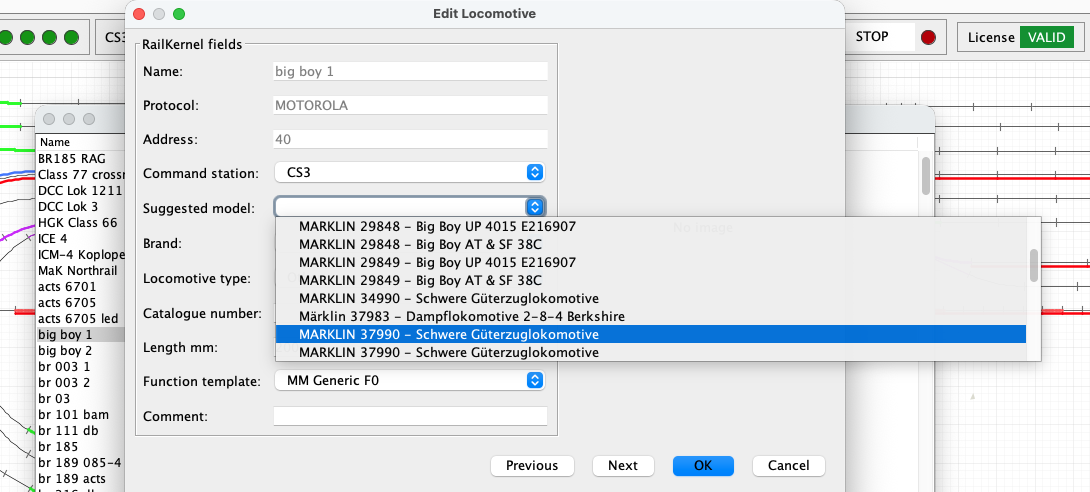
- RailKernel CloudのAI支援検索が、機関車名に一致しそうなRailKernel Model Database製品を探します。候補を選ぶと利用可能なブランド、製品番号、長さ、種類を設定し、画像を更新します。候補は証明ではないため、必ず実物と照合してください。
- ブランド
- メーカーまたはベンダーです。製品番号と共に、クラウド画像、製品ページ、マニュアル、著作権情報へ接続します。
- 機関車の種類
- 蒸気、ディーゼル、電気などの動力分類です。選択したRMDBモデルから提案できます。
- 製品番号
- 実物模型のメーカー製品番号です。正確な画像と資料を得るには正しい値が必要です。
- 長さ mm
- 模型の物理長です。ブロック内で車両を配置・追跡し、列車が収まるか確認するために使います。
- ファンクションテンプレート
- デコーダーのファンクション番号を、このモデルまたはデコーダー系列に適した一貫した名前、アイコン、動作へ対応付けます。
- コメント
- 機関車、デコーダー、保守、所有者、運転制限などの自由記述です。
モデル候補には意味のある名前が必要
クラウド検索は名前から意味のある語と製品番号らしい数値を抽出します。「locomotive1」のような一般名では車種や製品が分からず、有用な一致は期待できません。「ns1215」や「big boy 1」のような名前なら鉄道情報を認識して候補を返せます。下の例は「big boy 1」から複数のBig Boy模型を検出しています。実際に所有する機関車と一致するメーカー・製品だけを選んでください。
Calibrate and review a locomotive
The Calibrate and Calibration buttons in the locomotive definition record the real driving behaviour of the selected locomotive. RailKernel stores the measurements with the locomotive and can use them to translate decoder speed steps into realistic movement and stopping behaviour.
Calibrate
Calibrate opens the guided measurement run. Place the locomotive on the centre feedback B. RailKernel follows the connected track in both directions, respecting the current turnout positions, and lists every reachable feedback on each side with its geometrical OCCUPIED-to-OCCUPIED distance from the entry of B. Select A and C far enough away to provide sufficient measuring and braking distance. Calibration times only new OCCUPIED transitions reported for B and A/C. It never uses a FREE transition as a physical measuring or stopping reference, so release delays in RailKernel, the command station or the feedback module cannot distort the result. Then choose the decoder speed steps and directions to measure.
- RailKernel first positions the locomotive from B in reverse. It commands speed zero as soon as the first outer feedback A or C becomes occupied, so that the actual measurements can start in the forward direction.
- The selected speed steps are measured from high to low. For every run, timing starts when centre feedback B becomes occupied and stops when destination feedback A or C becomes occupied. Because the same leading detecting axle causes both transitions, the measured geometry runs from the entry of B to the entry of A/C.
- At that destination OCCUPIED transition RailKernel immediately commands speed zero. It does not wait for the feedback to become free.
- Once the locomotive has stopped, enter the braking distance from the beginning of the destination feedback to the leading detecting axle. Alternatively click the rail at the rear conducting axle; RailKernel adds the configured detection length, calculated from locomotive length and its front and rear detection overhang.
- When both directions are selected, RailKernel measures the same speed step in the return direction before continuing with the next lower step.
- You may cancel a long calibration run. RailKernel then asks whether the measurements collected so far must be saved. Repeating a measurement replaces the existing value for the same speed step and direction.
Calibration
Calibration opens the stored measurements without starting the locomotive. Each row shows the decoder speed step, direction, measured distance and time, speed in millimetres per second, calculated scale speed, the speed related to the locomotive’s configured maximum speed, and braking distance.
- If this locomotive has no measurements, select another calibrated locomotive and press Copy. RailKernel copies its calibration data to the current locomotive, after which the copy can be changed independently.
- Select one or more measurement rows to display Delete selected measurements. This removes only the selected speed-step and direction combinations.
- Green speed-step selections in the Calibrate dialog indicate measurements that already exist. A new run for such a selection updates the stored measurement.
- Start from scratch removes all existing measurement points when the actual measurement sequence begins after the positioning run. Without this option, only remeasured speed-step and direction combinations are replaced and all other points remain available.
- Measurements from an older FREE-based distance model are removed when this calibration is opened, because they cannot safely be mixed with OCCUPIED-to-OCCUPIED measurements.
From km/h to decoder speed steps
RailKernel uses the locomotive calibration as its base speed model. The measured curve relates decoder speed step and direction to actual movement in millimetres per second and to braking distance. The highest usable measurement is linked to the locomotive’s configured maximum speed; intermediate km/h values are interpolated over the measured, non-linear curve. The displayed km/h value is therefore a practical operating scale rather than a claim of laboratory-grade scale-speed accuracy.
Use while driving, braking and stopping
Manual km/h control and automatic routing use the same direction-dependent locomotive curve. A requested route speed is converted into the appropriate decoder step for forward or reverse running. When approaching a configured stop position, RailKernel combines the interpolated speed in mm/s with the measured braking distance to determine where the speed-zero command must be sent. Train-type acceleration and braking factors can still modify the result.
Train calibration as a load correction
Locomotive calibration describes the locomotive itself. Optional train calibration remains useful for measuring how a particular consist changes that behaviour through its mass, length, rolling resistance and vehicles. It samples only four operating speeds—50, 70, 90 and 110 km/h—and acts as a correction layer on top of the detailed locomotive curve, rather than as a competing speed model. Values between these points can be interpolated.
The calculation order is: requested km/h → direction-dependent locomotive curve → decoder step and base braking distance → optional train correction. If usable locomotive measurements are unavailable, RailKernel falls back to the existing train calibration and feedback/stop-position behaviour.