Nápověda
Zpětné kontakty
Zpětné kontakty sdělují RailKernelu, které části železnice jsou obsazené. Jejich adresy propojují fyzickou detekci s prvky plátna, bloky, pravidly akcí a automatickou jízdou.
Vytvoření a umístění kontaktu
Open New Feedback, enter or select an address and press OK, then select the connected detection section on the canvas. You can also plan a feedback without an address: set both module and contact to 0. Assign a valid address before creating it on a command station. For automatic placement within blocks, use Generate Feedbacks as described below.
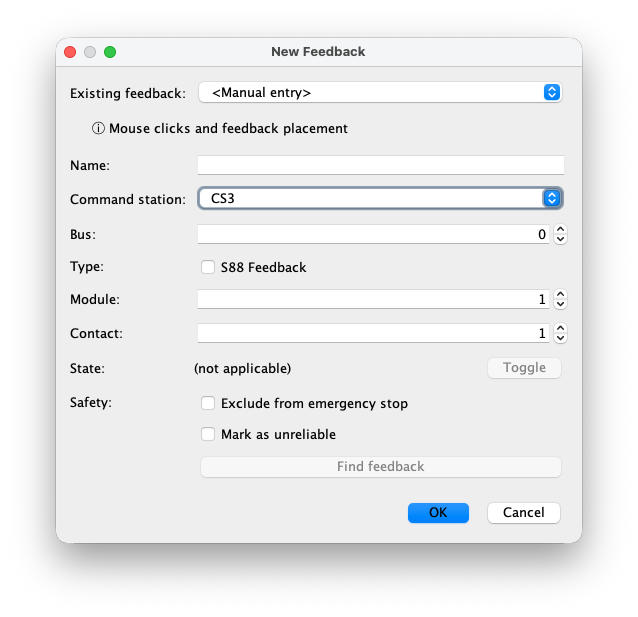
Pole dialogu Nový zpětný kontakt
For a wired feedback, the address must match the physical contact. Module 0 together with contact 0 means no address yet; a wired address uses a positive module number and contact 1–16.
- Existující kontakt
- Vyberte kontakt nalezený v centrále a převezměte jeho název a adresu, nebo použijte Ruční zadání.
- Název
- Jedinečný provozní název používaný na plátně, v blocích, monitorech, pravidlech a protokolech.
- Centrála
- Centrála, od které RailKernel přijímá stav tohoto kontaktu.
- Sběrnice
- Číslo sběrnice. U CS3 S88 Link jde o sběrnici 0 až 3; u jiných centrál význam určuje jejich ovladač.
- Zpětná vazba S88
- Zapněte pro kontakt na sběrnici S88 Link; vypněte pro přímé připojení centrály.
- Modul
- Číslo modulu na zvoleném přímém připojení nebo sběrnici S88.
- Kontakt
- The input number, 1–16, or 0 together with module 0 for an unassigned feedback. The combination of command station, connection type, bus, module and contact must be unique when assigned.
- Stav a Přepnout
- Při úpravě ukazuje FREE nebo OCCUPIED. Přepnout slouží k řízenému testování.
- Vyloučit z nouzového zastavení
- Změny tohoto kontaktu se neúčastní obecného nouzového zastavení. Používejte pouze při znalosti bezpečnostních důsledků.
- Označit jako nespolehlivé
- Zaznamená nestabilní či méně důvěryhodný detektor pro provoz a diagnostiku.
- Najít kontakt
- Při úpravě zavře definici a zvýrazní kontakt na plátně; upozorní také na použití v pravidle akce.
Generate feedbacks inside blocks
Choose Define → Generate Feedbacks, below Generate Blocks. This step creates placements without addresses and links them to their blocks. Enter Minimum Feedbacklength (mm), Maximum feedbacklength (mm) and Minimum #Feedbacks per block (default 3). Empty length fields mean no limit. Boundaries follow whole rail joints. Existing feedbacks keep their positions and count towards the minimum.
Recognized 24047 assemblies are processed first: the inner section between square brackets becomes one feedback, including its inner 24047 rails. The two outer rails are outside that feedback. The assembly must fit entirely in one block, and the feedback must meet the length limits. Conflicts, overlapping or unsupported blocks and ambiguous loops are reported. Valid newly created 24047 feedbacks remain even if the subsequent filling or spacing step cannot complete.
Complete filling: evenly sized sections
Check Fill blocks completely with feedbacks to cover all eligible rails in each block. RailKernel seeks the smallest feasible feedback count at or above the minimum, and makes the sections as equal in length as possible within the limits. The requested count is a minimum, not an exact count; the maximum length may require more sections. Existing feedbacks are not resized. This is useful for a DC layout with continuous detection.
Separate sections: short and evenly distributed
Leave Fill blocks completely with feedbacks unchecked (the default) for separate detection sections. RailKernel makes new sections as short as possible while respecting the minimum and maximum lengths, and spreads them as evenly as the rails and existing feedbacks allow.
Keep 1 rail distance from block boundaries leaves one complete rail element free at each end of an open block. Minimum distance between feedbacks (mm) is the free track length between sections, measured along the rails, not a straight-line distance. Both options must also fit around existing feedbacks. If no valid placement exists, the summary explains why. Adjust the limits or minimum count and run again; existing placements remain.
Delete maiden feedbacks
The bottom-left Delete maiden feedbacks button removes all feedbacks without an address in the project, including manually placed ones, after confirmation. Their links are removed; rails and blocks remain. Action rules referring to deleted feedbacks are disabled. This is a project-wide cleanup, not just the last generation run. Feedbacks with addresses are kept.
Generate addresses and module positions
Choose Define → Generate Feedback Addresses after placing feedbacks. Set # native buses (default 1), # s88 buses (default 2) and # available extra 16-contact modules. The third value is additional hardware, not the total including existing modules. Its default is the minimum required after accounting for free contacts on existing modules. With several command stations, bus counts apply per station; extra modules are a shared total.
Press OK to calculate a plan for all unassigned feedbacks. Existing addresses and stored module positions stay fixed; free contacts on those modules are available for reuse. New modules are placed to reduce total wire length within their 16-contact capacity, then distributed as evenly as possible across the configured native and S88 buses, taking existing module counts into account. Extra modules can improve placement; unused ones need not be created. This is an optimization, not a guarantee of the mathematical global minimum.
The summary reports assigned addresses, reused contacts, added modules and new wire length. Insufficient capacity, duplicate addresses or unusable geometry are reported before applying a plan. Generation changes the project; it does not automatically program or synchronize the command station. Check the physical wiring and use the normal synchronization workflow afterwards.
Show infrastructure and route around buildings
View → Show Feedback Infra, below Show Design, displays a blue circled M for each addressed module and blue wires to its feedbacks. Module identity includes command station, native/S88 type, bus and module number. Address generation switches this view on. Showing the infrastructure alone does not assign addresses.
Buildings act as obstacles during infrastructure generation. To keep wires out of an aisle, draw a temporary building over that area before generating addresses. Keep feedback connection points and fixed modules outside its outline. Module positions and wire routes avoid the buildings; an impossible route is reported. Save the project after generation. The routes, module positions and generated-address markers are persisted, so removing the temporary building afterwards does not straighten the saved detour.
Undo generated addresses and try again
Use Undo generated addresses at the bottom left of the address-generation dialog. After confirmation it removes all addresses still marked as generated, including those from earlier runs and after reopening the saved project. Feedback placements and manual addresses remain. Generated modules with no remaining addressed feedbacks are removed. Manually changing an address makes it manual and protects it from this cleanup. You can then adjust obstacles, bus counts or extra modules and generate a new plan. Save again to retain the change.
Správce zpětných kontaktů
Dokovatelný správce porovnává definice kolejiště s kontakty připojených centrál. Tabulka zobrazuje stav, centrálu, název kolejiště, skutečný název v centrále, zdroj, sběrnici, modul a kontakt. Shoda používá úplnou fyzickou adresu, nikoli název.
Stavy porovnání a platné rozsahy
Každý řádek má jeden ze čtyř stavů:
- Shoda
- Jedna definice kolejiště a jedna položka centrály používají stejnou úplnou fyzickou adresu.
- Pouze kolejiště
- Kontakt je definován v kolejišti, ale v centrále chybí.
- Pouze centrála
- Centrála obsahuje kontakt bez definice v kolejišti.
- Konflikt
- Stejné fyzické místo používá více definic, takže nelze určit jednoznačnou shodu.
Mimo rozsah je doplňkové varování, nikoli pátý stav. Červené řádky mají číslo modulu vyšší než délka sběrnice hlášená danou CS3, případně vyšší než definovaná délka. Neznámé hodnoty S88 se považují za nulu, pokud centrála žádnou sběrnici S88 nehlásí.
Synchronizace kontaktů s centrálou
Sync Feedbacks with CS je aktivní pouze pro jednu podporovanou centrálu. Po potvrzení vytvoří položky z kolejiště, odstraní položky existující pouze v centrále a jednoznačné konflikty nahradí definicí kolejiště. Průběhové okno zůstane otevřené do stisku OK a správce poté data znovu načte.
Odstranění ze správné strany
Pouze kolejiště odstraní definici RailKernelu, Pouze centrála položku centrály a Shoda obě strany. Každá operace vyžaduje potvrzení. Kontakt použitý blokem odstranit nelze a mazání v centrále musí její ovladač podporovat.
Monitor zpětné vazby
Monitor zobrazuje celý adresní prostor každé centrály. Řádek představuje přímý nebo S88 modul a sloupce kontakty 1 až 16. Live sleduje události, Obnovit znovu sestaví pohled a dvojklik otevře definovaný kontakt.
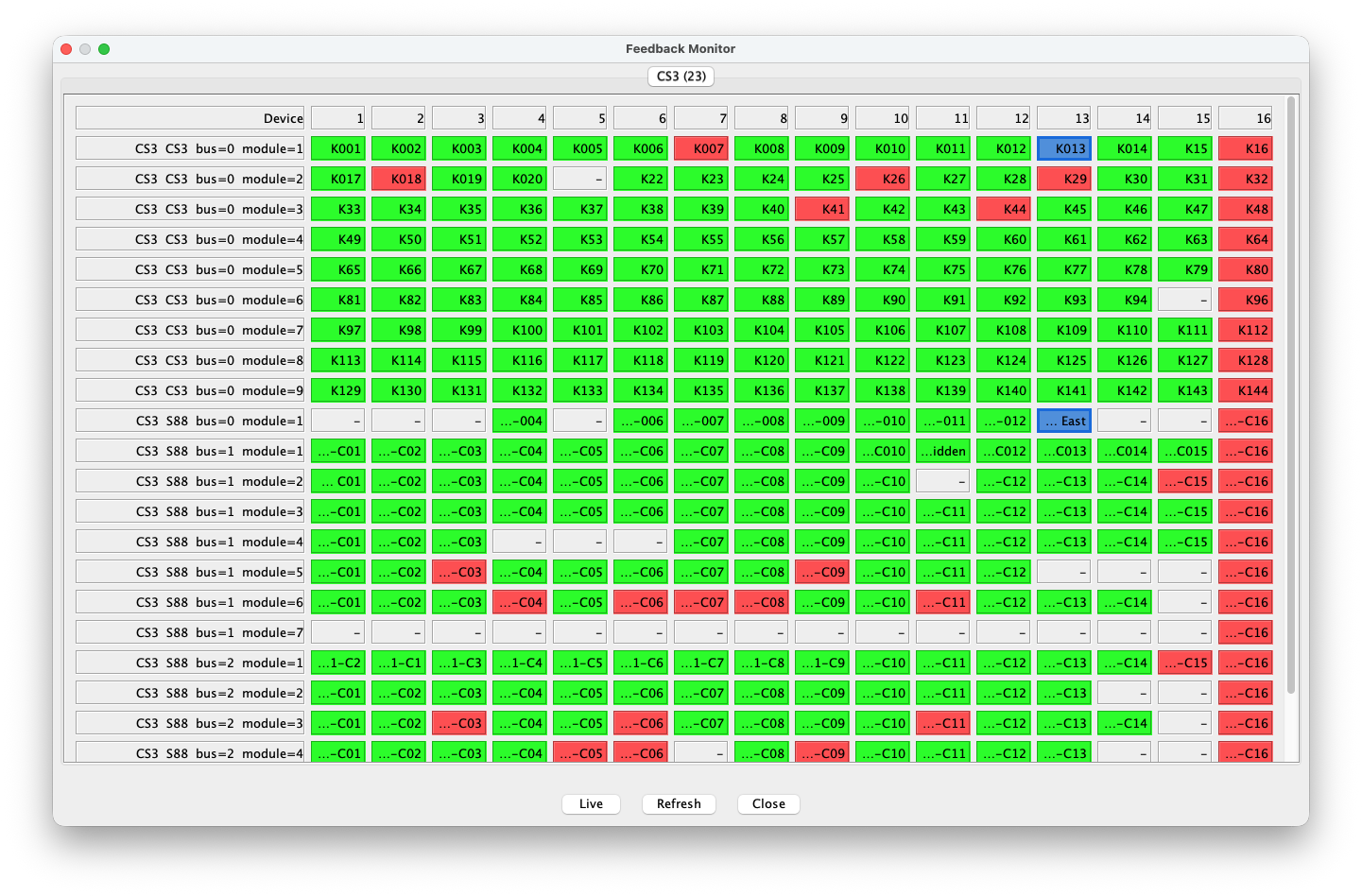
Barvy monitoru
Zelená znamená volný definovaný kontakt, červená obsazený a šedá neobsazenou fyzickou adresu bez definice. Modrý okraj označuje kontakt aktivního pravidla akce. Barvy lze změnit v Nastavení.
Live a Live: RAW
Live ukazuje zpracované změny definovaných kontaktů. Live: RAW zobrazuje všechny syrové události před filtrováním. Po spuštění vynuluje počitadla a každá změna zvýší hodnotu přesné fyzické adresy; sílící červená rychle odhalí nestabilní vstupy nebo chyby sběrnice.
Čísla v příkladu jsou počty událostí, nikoli adresy či stavy. Zdravý klidný kontakt zůstane bez barvy. Soustředění červených buněk v jedné oblasti S88 pomáhá rozlišit vadný vstup od společného problému modulu, kabelu, napájení či sběrnice.

Délky sběrnic zpětné vazby CS3
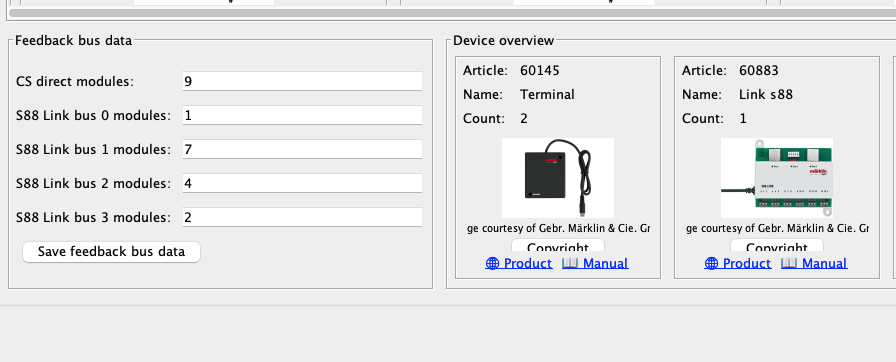
Panel Feedback bus data v přehledu CS3 má sloupce Defined, Configured a Calculated. První obsahuje uložené délky RailKernelu, druhý hodnoty přečtené z konkrétní CS3 a třetí potřebné délky odvozené z projektu. RailKernel definice centrály nikdy nemění bez výslovného souhlasu.