
Hjælp
Lokomotiver
Et lokomotiv er det individuelt adresserbare motorkøretøj, som RailKernel styrer gennem en centralstation.
Lokomotiver i RailKernel og centralstationerne
En centralstation kender de oplysninger, der kræves for at køre et lokomotiv: intern identitet, protokol, dekoderadresse, køretrin og funktioner. RailKernel importerer denne driftsidentitet og tilføjer projektoplysninger over protokollaget, for eksempel den ansvarlige centralstation, producent, artikelnummer, fysisk længde, lokomotivtype, funktionsskabelon, billede og kommentarer. Import opretter RailKernel-definitionen; den registrerer ikke dekoderen igen.
Importer lokomotiver
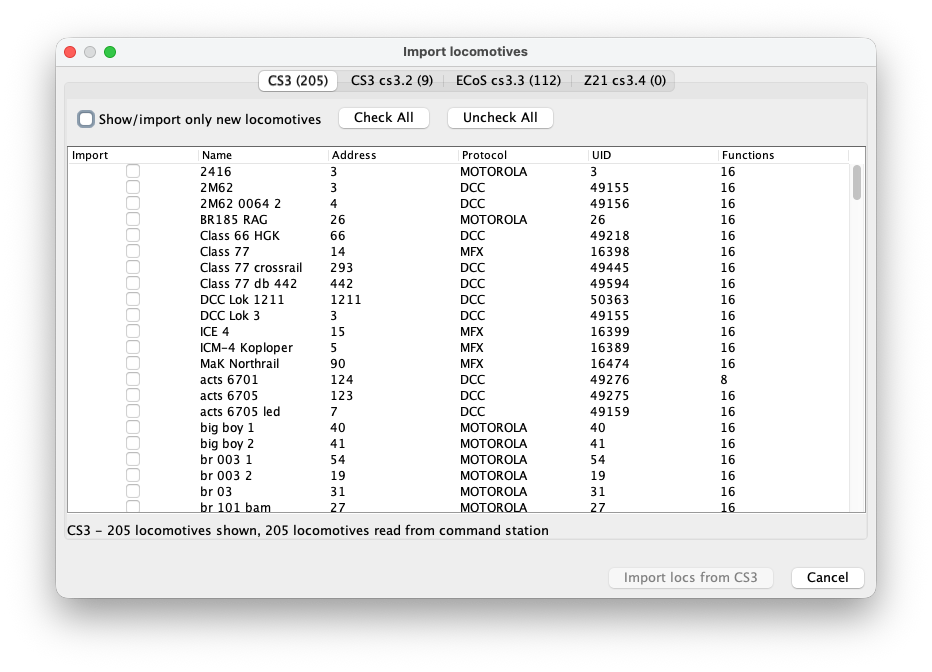
Åbn lokomotivimporten fra menuen. RailKernel læser lokomotivlisten fra alle tilsluttede centralstationer og giver hver station sin egen fane. Tabellen viser, om en post importeres, samt navn, adresse, protokol, UID og antal funktioner. Faneteksten og statuslinjen viser, hvor mange poster der blev læst og vist.
Vælg, hvad der skal importeres
Markér individuelle afkrydsningsfelter, når kun bestemte lokomotiver hører til projektet. Markér alle vælger alle synlige importerbare rækker, og Fjern alle markeringer rydder dem. Vis/importer kun nye lokomotiver skjuler poster, som RailKernel allerede genkender. Tryk på Importer lokomotiver fra den valgte centralstation for at tilføje definitionerne, og gentag på andre faner efter behov.
Lokomotivadministratoren
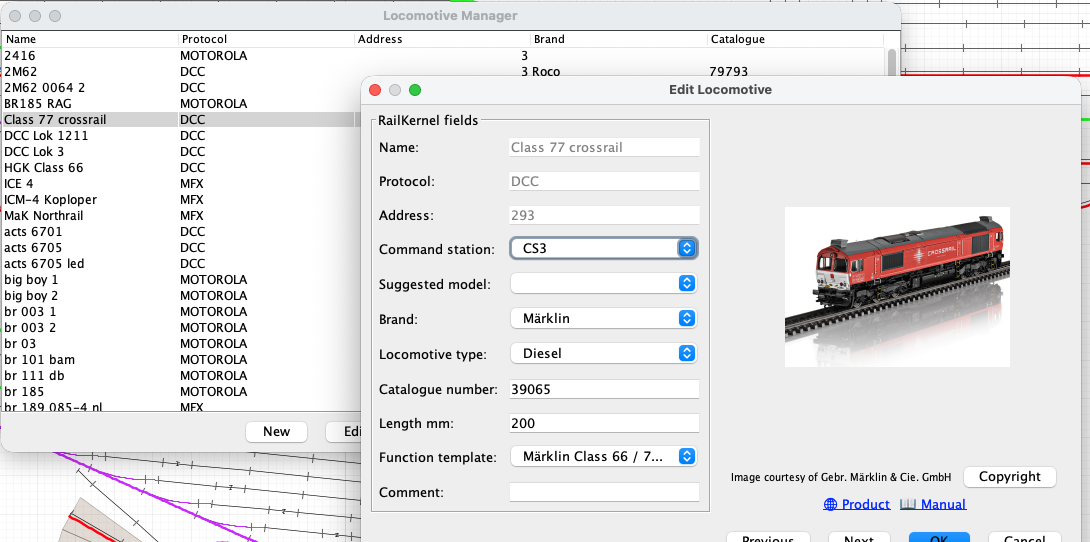
Åbn Lokomotiver fra menuen for at se projektets lokomotivliste. Tabellen kan sorteres og filtreres og viser driftsidentiteten sammen med producent- og katalogoplysninger. Ny opretter et lokomotiv manuelt, Rediger åbner definitionen, Styring åbner direkte lokomotivstyring, og Slet fjerner valgte projektposter.
Lokomotivoplysninger
- Navn
- Centralstationens eller projektets navn, som anvendes overalt i RailKernel. Et meningsfuldt navn giver også Foreslået model brugbare søgeoplysninger.
- Protokol
- Dekoderprotokollen, for eksempel DCC, MFX eller Motorola. Sammen med adressen og centralstationen bestemmer den, hvordan køre- og funktionskommandoer sendes.
- Adresse
- Dekoderadressen, som den valgte centralstation anvender. Importerede protokol- og adresseværdier stammer fra stationen.
- Centralstation
- Den konfigurerede station, der er ansvarlig for lokomotivet. Alle hastigheds-, retnings- og funktionskommandoer sendes til denne forbindelse.
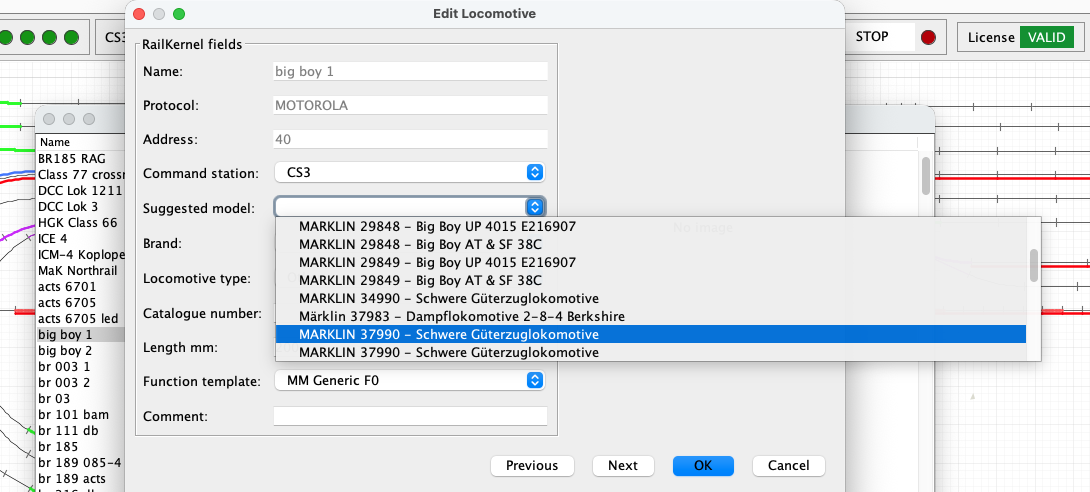
- Foreslået model
- En AI-understøttet forespørgsel i RailKernel Cloud søger i RailKernel Model Database efter produkter, der kan passe til lokomotivnavnet. Et valgt resultat udfylder tilgængelige producent-, artikelnummer-, længde- og typeoplysninger. Forslag er kandidater og ikke bevis; kontroller altid modellen.
- Producent
- Producenten eller leverandøren. Sammen med artikelnummeret forbinder den lokomotivet med billeder, produktsider, vejledninger og ophavsretsoplysninger.
- Lokomotivtype
- Trækkrafttypen, for eksempel damp, diesel, elektrisk eller andet. En valgt RMDB-model kan foreslå værdien.
- Artikelnummer
- Producentens artikelnummer for den fysiske model. Præcise værdier er afgørende for det korrekte billede og den korrekte dokumentation.
- Længde mm
- Modellens fysiske længde i millimeter. RailKernel bruger den ved placering og positionsopfølgning i blokke samt ved kontrol af, om tog passer.
- Funktionsskabelon
- Knytter dekoderfunktioner til ensartede navne, ikoner og adfærd, der passer til modellen eller dekoderfamilien.
- Kommentar
- Frie noter om lokomotiv, dekoder, vedligeholdelse, ejerskab eller driftsbegrænsninger.
Foreslået model kræver et brugbart navn
Cloudsøgningen udtrækker meningsfulde ord og kataloglignende numre fra navnet. Et generisk navn som “lokomotiv1” siger intet om forbilledet eller produktet og giver sandsynligvis intet brugbart match. Navne som “ns1215” eller “big boy 1” indeholder genkendelige jernbaneoplysninger og kan give relevante kandidater. Vælg kun den præcise producent og artikel, når den svarer til det lokomotiv, du faktisk ejer.
Calibrate and review a locomotive
The Calibrate and Calibration buttons in the locomotive definition record the real driving behaviour of the selected locomotive. RailKernel stores the measurements with the locomotive and can use them to translate decoder speed steps into realistic movement and stopping behaviour.
Calibrate
Calibrate opens the guided measurement run. Place the locomotive on the centre feedback B. RailKernel follows the connected track in both directions, respecting the current turnout positions, and lists every reachable feedback on each side with its geometrical OCCUPIED-to-OCCUPIED distance from the entry of B. Select A and C far enough away to provide sufficient measuring and braking distance. Calibration times only new OCCUPIED transitions reported for B and A/C. It never uses a FREE transition as a physical measuring or stopping reference, so release delays in RailKernel, the command station or the feedback module cannot distort the result. Then choose the decoder speed steps and directions to measure.
- RailKernel first positions the locomotive from B in reverse. It commands speed zero as soon as the first outer feedback A or C becomes occupied, so that the actual measurements can start in the forward direction.
- The selected speed steps are measured from high to low. For every run, timing starts when centre feedback B becomes occupied and stops when destination feedback A or C becomes occupied. Because the same leading detecting axle causes both transitions, the measured geometry runs from the entry of B to the entry of A/C.
- At that destination OCCUPIED transition RailKernel immediately commands speed zero. It does not wait for the feedback to become free.
- Once the locomotive has stopped, enter the braking distance from the beginning of the destination feedback to the leading detecting axle. Alternatively click the rail at the rear conducting axle; RailKernel adds the configured detection length, calculated from locomotive length and its front and rear detection overhang.
- When both directions are selected, RailKernel measures the same speed step in the return direction before continuing with the next lower step.
- You may cancel a long calibration run. RailKernel then asks whether the measurements collected so far must be saved. Repeating a measurement replaces the existing value for the same speed step and direction.
Calibration
Calibration opens the stored measurements without starting the locomotive. Each row shows the decoder speed step, direction, measured distance and time, speed in millimetres per second, calculated scale speed, the speed related to the locomotive’s configured maximum speed, and braking distance.
- If this locomotive has no measurements, select another calibrated locomotive and press Copy. RailKernel copies its calibration data to the current locomotive, after which the copy can be changed independently.
- Select one or more measurement rows to display Delete selected measurements. This removes only the selected speed-step and direction combinations.
- Green speed-step selections in the Calibrate dialog indicate measurements that already exist. A new run for such a selection updates the stored measurement.
- Start from scratch removes all existing measurement points when the actual measurement sequence begins after the positioning run. Without this option, only remeasured speed-step and direction combinations are replaced and all other points remain available.
- Measurements from an older FREE-based distance model are removed when this calibration is opened, because they cannot safely be mixed with OCCUPIED-to-OCCUPIED measurements.
From km/h to decoder speed steps
RailKernel uses the locomotive calibration as its base speed model. The measured curve relates decoder speed step and direction to actual movement in millimetres per second and to braking distance. The highest usable measurement is linked to the locomotive’s configured maximum speed; intermediate km/h values are interpolated over the measured, non-linear curve. The displayed km/h value is therefore a practical operating scale rather than a claim of laboratory-grade scale-speed accuracy.
Use while driving, braking and stopping
Manual km/h control and automatic routing use the same direction-dependent locomotive curve. A requested route speed is converted into the appropriate decoder step for forward or reverse running. When approaching a configured stop position, RailKernel combines the interpolated speed in mm/s with the measured braking distance to determine where the speed-zero command must be sent. Train-type acceleration and braking factors can still modify the result.
Train calibration as a load correction
Locomotive calibration describes the locomotive itself. Optional train calibration remains useful for measuring how a particular consist changes that behaviour through its mass, length, rolling resistance and vehicles. It samples only four operating speeds—50, 70, 90 and 110 km/h—and acts as a correction layer on top of the detailed locomotive curve, rather than as a competing speed model. Values between these points can be interpolated.
The calculation order is: requested km/h → direction-dependent locomotive curve → decoder step and base braking distance → optional train correction. If usable locomotive measurements are unavailable, RailKernel falls back to the existing train calibration and feedback/stop-position behaviour.