
Ayuda
Locomotoras
Una locomotora es el vehículo motor direccionable individualmente que RailKernel controla mediante una central digital.
Locomotoras en RailKernel y en las centrales
Una central conoce lo necesario para conducir: identidad interna, protocolo, dirección, pasos de velocidad y funciones. RailKernel importa esa identidad operativa y añade información del proyecto, como central propietaria, fabricante, artículo, longitud, tipo, plantilla de funciones, imagen y comentarios. Una locomotora puede existir primero en la central. Importarla crea la definición de RailKernel; no duplica ni vuelve a registrar el decodificador.
Importar locomotoras
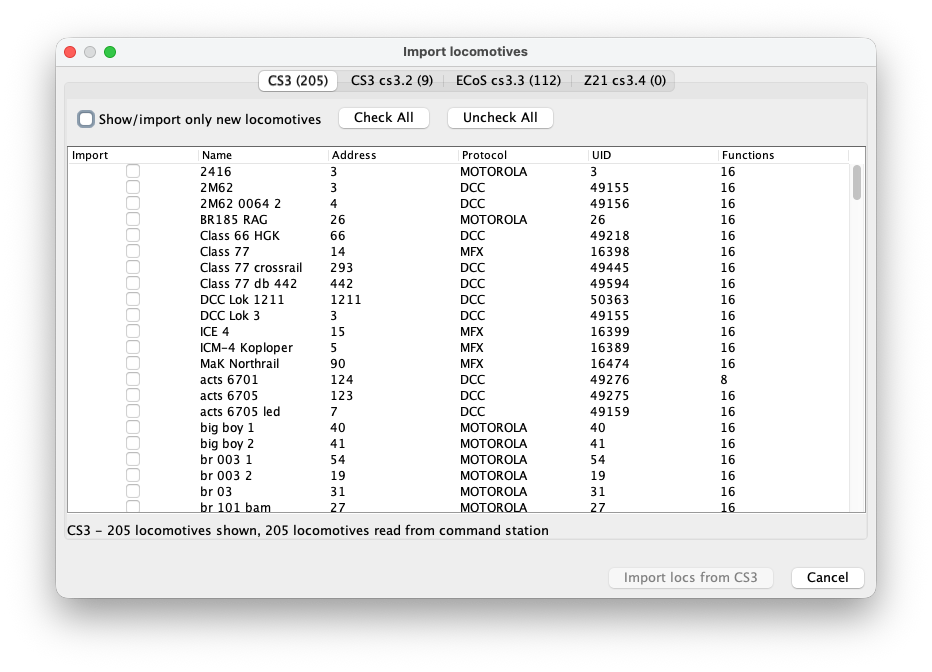
Abra la función de importación. RailKernel lee la lista de cada central conectada y crea una pestaña por central. La tabla muestra si se importará cada entrada, junto con nombre, dirección, protocolo, UID y cantidad de funciones. La pestaña y el pie indican cuántas entradas se leyeron y muestran.
Seleccionar qué importar
Marque las casillas individuales o utilice Seleccionar todo y Deseleccionar todo. Mostrar/importar solo locomotoras nuevas oculta las que RailKernel ya reconoce. Las combinaciones existentes de dirección, protocolo y central, así como registros de tracción que no sean locomotoras normales, están protegidos contra duplicación. Pulse Importar locomotoras desde la central seleccionada y repita en otras pestañas si procede.
Administrador de locomotoras
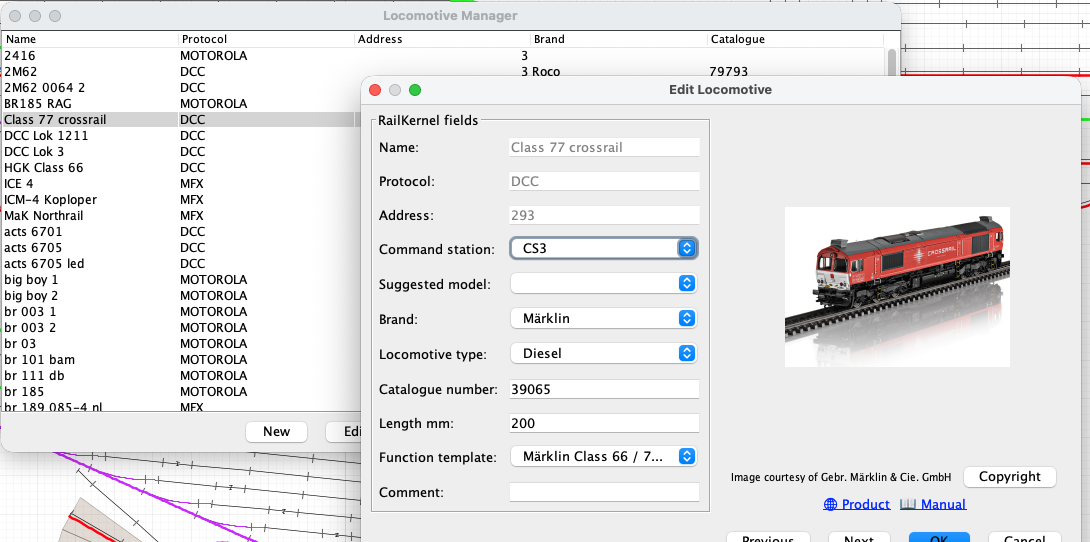
Abra Locomotoras para ver la lista del proyecto. La tabla puede ordenarse y filtrarse y combina la identidad operativa con fabricante y artículo. Nueva crea una definición manual, Editar abre la seleccionada, Control abre el mando directo y Eliminar borra las entradas elegidas. Anterior y Siguiente permiten recorrer la lista desde el editor.
Detalles de la locomotora
- Nombre
- Nombre de la central o del proyecto utilizado en RailKernel. En locomotoras importadas la identidad operativa permanece protegida. Un nombre descriptivo también mejora Modelo sugerido.
- Protocolo
- Protocolo del decodificador, como DCC, MFX o Motorola. Junto con la dirección y la central determina cómo se envían las órdenes.
- Dirección
- Dirección utilizada por la central seleccionada. En locomotoras importadas procede de esa central y no se modifica de forma casual al editar metadatos.
- Central digital
- Central responsable de la locomotora. Todas las órdenes de velocidad, sentido y funciones se envían a esa conexión.
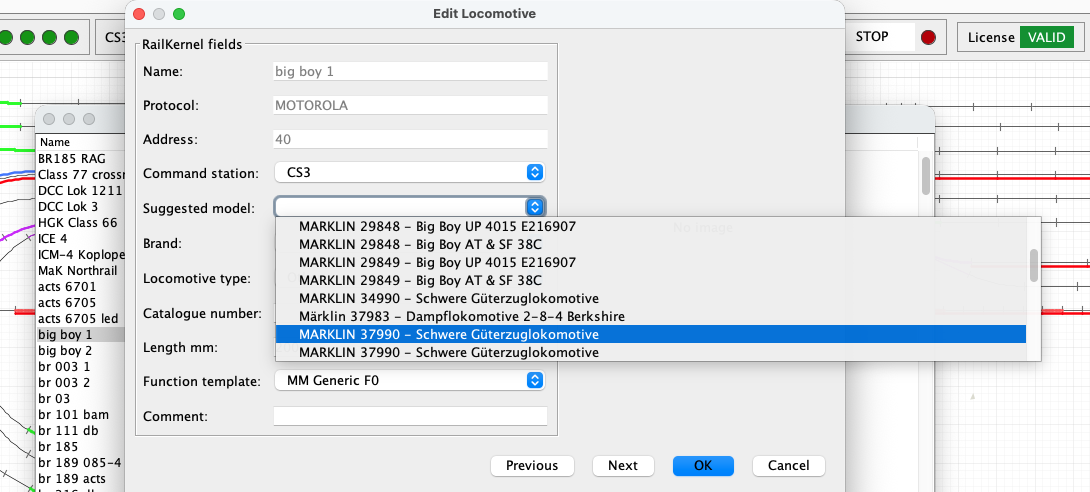
- Modelo sugerido
- Una búsqueda asistida en RailKernel Cloud consulta RMDB para encontrar productos que puedan coincidir con el nombre. Elegir un resultado rellena los datos disponibles y actualiza la imagen. Son candidatos, no una prueba: compruebe siempre el modelo.
- Fabricante
- Fabricante o marca. Junto con el artículo vincula la locomotora con imágenes, páginas, manuales y copyright.
- Tipo de locomotora
- Categoría de tracción, por ejemplo vapor, diésel, eléctrica u otra. RMDB puede sugerirla.
- Número de catálogo
- Número de artículo del fabricante. Un valor exacto es esencial para obtener la imagen y documentación correctas.
- Longitud en mm
- Longitud física del modelo. RailKernel la utiliza para situar y seguir material en bloques y comprobar si los trenes caben.
- Plantilla de funciones
- Asocia números de función del decodificador con nombres, iconos y comportamientos coherentes.
- Comentario
- Notas libres sobre locomotora, decodificador, mantenimiento, propietario o restricciones.
Modelo sugerido necesita un nombre útil
La búsqueda extrae palabras significativas y números similares a artículos. Un nombre genérico como “locomotora1” no aporta información. Nombres como “ns1215” o “big boy 1” contienen datos reconocibles y pueden devolver candidatos relevantes. El ejemplo muestra varios Big Boy encontrados a partir de “big boy 1”. Elija fabricante y artículo solo si coinciden con su modelo real.
Calibrate and review a locomotive
The Calibrate and Calibration buttons in the locomotive definition record the real driving behaviour of the selected locomotive. RailKernel stores the measurements with the locomotive and can use them to translate decoder speed steps into realistic movement and stopping behaviour.
Calibrate
Calibrate opens the guided measurement run. Place the locomotive on the centre feedback B. RailKernel follows the connected track in both directions, respecting the current turnout positions, and lists every reachable feedback on each side with its geometrical OCCUPIED-to-OCCUPIED distance from the entry of B. Select A and C far enough away to provide sufficient measuring and braking distance. Calibration times only new OCCUPIED transitions reported for B and A/C. It never uses a FREE transition as a physical measuring or stopping reference, so release delays in RailKernel, the command station or the feedback module cannot distort the result. Then choose the decoder speed steps and directions to measure.
- RailKernel first positions the locomotive from B in reverse. It commands speed zero as soon as the first outer feedback A or C becomes occupied, so that the actual measurements can start in the forward direction.
- The selected speed steps are measured from high to low. For every run, timing starts when centre feedback B becomes occupied and stops when destination feedback A or C becomes occupied. Because the same leading detecting axle causes both transitions, the measured geometry runs from the entry of B to the entry of A/C.
- At that destination OCCUPIED transition RailKernel immediately commands speed zero. It does not wait for the feedback to become free.
- Once the locomotive has stopped, enter the braking distance from the beginning of the destination feedback to the leading detecting axle. Alternatively click the rail at the rear conducting axle; RailKernel adds the configured detection length, calculated from locomotive length and its front and rear detection overhang.
- When both directions are selected, RailKernel measures the same speed step in the return direction before continuing with the next lower step.
- You may cancel a long calibration run. RailKernel then asks whether the measurements collected so far must be saved. Repeating a measurement replaces the existing value for the same speed step and direction.
Calibration
Calibration opens the stored measurements without starting the locomotive. Each row shows the decoder speed step, direction, measured distance and time, speed in millimetres per second, calculated scale speed, the speed related to the locomotive’s configured maximum speed, and braking distance.
- If this locomotive has no measurements, select another calibrated locomotive and press Copy. RailKernel copies its calibration data to the current locomotive, after which the copy can be changed independently.
- Select one or more measurement rows to display Delete selected measurements. This removes only the selected speed-step and direction combinations.
- Green speed-step selections in the Calibrate dialog indicate measurements that already exist. A new run for such a selection updates the stored measurement.
- Start from scratch removes all existing measurement points when the actual measurement sequence begins after the positioning run. Without this option, only remeasured speed-step and direction combinations are replaced and all other points remain available.
- Measurements from an older FREE-based distance model are removed when this calibration is opened, because they cannot safely be mixed with OCCUPIED-to-OCCUPIED measurements.
From km/h to decoder speed steps
RailKernel uses the locomotive calibration as its base speed model. The measured curve relates decoder speed step and direction to actual movement in millimetres per second and to braking distance. The highest usable measurement is linked to the locomotive’s configured maximum speed; intermediate km/h values are interpolated over the measured, non-linear curve. The displayed km/h value is therefore a practical operating scale rather than a claim of laboratory-grade scale-speed accuracy.
Use while driving, braking and stopping
Manual km/h control and automatic routing use the same direction-dependent locomotive curve. A requested route speed is converted into the appropriate decoder step for forward or reverse running. When approaching a configured stop position, RailKernel combines the interpolated speed in mm/s with the measured braking distance to determine where the speed-zero command must be sent. Train-type acceleration and braking factors can still modify the result.
Train calibration as a load correction
Locomotive calibration describes the locomotive itself. Optional train calibration remains useful for measuring how a particular consist changes that behaviour through its mass, length, rolling resistance and vehicles. It samples only four operating speeds—50, 70, 90 and 110 km/h—and acts as a correction layer on top of the detailed locomotive curve, rather than as a competing speed model. Values between these points can be interpolated.
The calculation order is: requested km/h → direction-dependent locomotive curve → decoder step and base braking distance → optional train correction. If usable locomotive measurements are unavailable, RailKernel falls back to the existing train calibration and feedback/stop-position behaviour.