ヘルプ
フィードバック接点
フィードバック接点は、鉄道のどの部分が在線しているかをRailKernelへ知らせます。物理検出器のアドレスをキャンバス要素、ブロック、アクション規則、自動運転に接続します。
フィードバックを作成・配置する
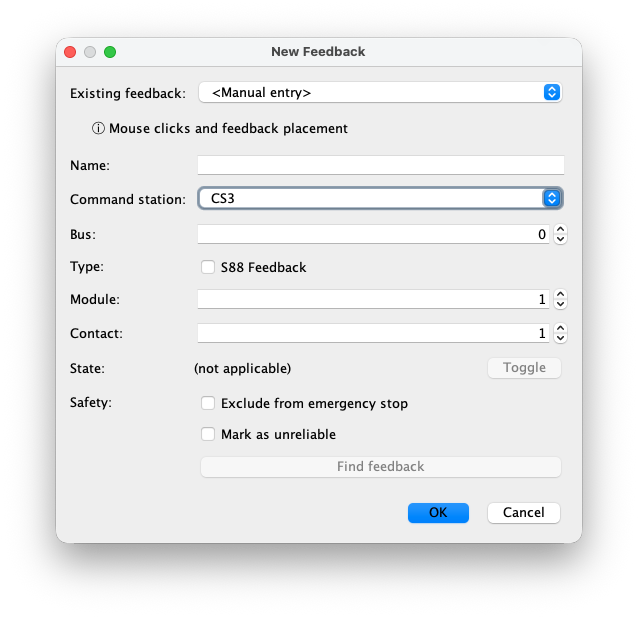
Open New Feedback, enter or select an address and press OK, then select the connected detection section on the canvas. You can also plan a feedback without an address: set both module and contact to 0. Assign a valid address before creating it on a command station. For automatic placement within blocks, use Generate Feedbacks as described below.
「新しいフィードバック」の項目
For a wired feedback, the address must match the physical contact. Module 0 together with contact 0 means no address yet; a wired address uses a positive module number and contact 1–16.
- 既存のフィードバック
- コマンドステーションで検出済みのフィードバックを選んで名前とアドレスをコピーするか、手入力を選びます。
- 名前
- キャンバス、ブロック、モニター、アクション規則、ログで使う一意の運転用名称です。物理検出区間が分かる名前にしてください。
- コマンドステーション
- このフィードバック状態をRailKernelが受信するコマンドステーションです。
- バス
- フィードバックバス番号です。CS3 S88 Linkでは0、1、2、3を選びます。その他の意味はドライバーとプロトコルに従います。
- S88フィードバック
- S88 Linkバス経由の接点なら選択します。コマンドステーションの直接接続なら選択しません。
- モジュール
- 選択した直接接続またはS88バス上のモジュール番号です。
- 接点
- The input number, 1–16, or 0 together with module 0 for an unassigned feedback. The combination of command station, connection type, bus, module and contact must be unique when assigned.
- 状態と切替
- 既存定義では現在のFREEまたはOCCUPIEDを表示します。「切替」は制御されたテストに使用できます。新規定義にはまだ切替対象の状態がありません。
- 緊急停止から除外
- この接点の変化を一般緊急停止処理から除外します。目的と安全上の影響を理解している検出器にだけ使用してください。
- 不安定として記録
- 検出器が不安定または信頼性が低いことを記録し、運転中と障害調査中に見えるようにします。
- フィードバックを探す
- 編集を閉じ、キャンバス上のフィードバックを強調表示します。アクション規則で参照されている場合も警告します。
Generate feedbacks inside blocks
Choose Define → Generate Feedbacks, below Generate Blocks. This step creates placements without addresses and links them to their blocks. Enter Minimum Feedbacklength (mm), Maximum feedbacklength (mm) and Minimum #Feedbacks per block (default 3). Empty length fields mean no limit. Boundaries follow whole rail joints. Existing feedbacks keep their positions and count towards the minimum.
Recognized 24047 assemblies are processed first: the inner section between square brackets becomes one feedback, including its inner 24047 rails. The two outer rails are outside that feedback. The assembly must fit entirely in one block, and the feedback must meet the length limits. Conflicts, overlapping or unsupported blocks and ambiguous loops are reported. Valid newly created 24047 feedbacks remain even if the subsequent filling or spacing step cannot complete.
Complete filling: evenly sized sections
Check Fill blocks completely with feedbacks to cover all eligible rails in each block. RailKernel seeks the smallest feasible feedback count at or above the minimum, and makes the sections as equal in length as possible within the limits. The requested count is a minimum, not an exact count; the maximum length may require more sections. Existing feedbacks are not resized. This is useful for a DC layout with continuous detection.
Separate sections: short and evenly distributed
Leave Fill blocks completely with feedbacks unchecked (the default) for separate detection sections. RailKernel makes new sections as short as possible while respecting the minimum and maximum lengths, and spreads them as evenly as the rails and existing feedbacks allow.
Keep 1 rail distance from block boundaries leaves one complete rail element free at each end of an open block. Minimum distance between feedbacks (mm) is the free track length between sections, measured along the rails, not a straight-line distance. Both options must also fit around existing feedbacks. If no valid placement exists, the summary explains why. Adjust the limits or minimum count and run again; existing placements remain.
Delete maiden feedbacks
The bottom-left Delete maiden feedbacks button removes all feedbacks without an address in the project, including manually placed ones, after confirmation. Their links are removed; rails and blocks remain. Action rules referring to deleted feedbacks are disabled. This is a project-wide cleanup, not just the last generation run. Feedbacks with addresses are kept.
Generate addresses and module positions
Choose Define → Generate Feedback Addresses after placing feedbacks. Set # native buses (default 1), # s88 buses (default 2) and # available extra 16-contact modules. The third value is additional hardware, not the total including existing modules. Its default is the minimum required after accounting for free contacts on existing modules. With several command stations, bus counts apply per station; extra modules are a shared total.
Press OK to calculate a plan for all unassigned feedbacks. Existing addresses and stored module positions stay fixed; free contacts on those modules are available for reuse. New modules are placed to reduce total wire length within their 16-contact capacity, then distributed as evenly as possible across the configured native and S88 buses, taking existing module counts into account. Extra modules can improve placement; unused ones need not be created. This is an optimization, not a guarantee of the mathematical global minimum.
The summary reports assigned addresses, reused contacts, added modules and new wire length. Insufficient capacity, duplicate addresses or unusable geometry are reported before applying a plan. Generation changes the project; it does not automatically program or synchronize the command station. Check the physical wiring and use the normal synchronization workflow afterwards.
Show infrastructure and route around buildings
View → Show Feedback Infra, below Show Design, displays a blue circled M for each addressed module and blue wires to its feedbacks. Module identity includes command station, native/S88 type, bus and module number. Address generation switches this view on. Showing the infrastructure alone does not assign addresses.
Buildings act as obstacles during infrastructure generation. To keep wires out of an aisle, draw a temporary building over that area before generating addresses. Keep feedback connection points and fixed modules outside its outline. Module positions and wire routes avoid the buildings; an impossible route is reported. Save the project after generation. The routes, module positions and generated-address markers are persisted, so removing the temporary building afterwards does not straighten the saved detour.
Undo generated addresses and try again
Use Undo generated addresses at the bottom left of the address-generation dialog. After confirmation it removes all addresses still marked as generated, including those from earlier runs and after reopening the saved project. Feedback placements and manual addresses remain. Generated modules with no remaining addressed feedbacks are removed. Manually changing an address makes it manual and protects it from this cleanup. You can then adjust obstacles, bus counts or extra modules and generate a new plan. Save again to retain the change.
フィードバックマネージャー
ドッキング可能なフィードバックマネージャーは、レイアウト定義と接続中のコマンドステーションから読み取ったフィードバックを比較します。「すべて」または個別のステーションを選べます。表にはステータス、コマンドステーション、レイアウト名、実際のCS名、接続元、バス、モジュール、接点、運転情報が表示されます。一致判定は名前ではなく、ステーション、直接/S88、バス、モジュール、接点で行います。
比較ステータスと有効範囲
各行には4種類の比較ステータスのいずれかが付きます。
- 一致
- レイアウトとCSの各1件が、ステーション、接続元、バス、モジュール、接点で一致します。
- レイアウトのみ
- RailKernelレイアウトにはありますが、コマンドステーションにはありません。
- コマンドステーションのみ
- コマンドステーションにはありますが、対応するレイアウト定義がありません。
- 競合
- 同じ物理位置に複数のレイアウトまたはCSフィードバックがあり、一意に一致できません。
範囲外は5番目のステータスではなく追加警告です。赤い行は、そのCS3が報告した設定済みバス長、または設定値がない場合の定義済み長を超えるモジュール番号を使用しています。1台を選ぶと、セレクター横に判定に使うCS3直接接続長とS88 Linkバス0~3の長さが表示されます。CSがS88バスなしと報告した場合、不明値は0として扱います。
コマンドステーションとフィードバックを同期する
「CSとフィードバックを同期」は、削除をサポートする1台のコマンドステーションを選んだ場合だけ有効です。確認後、対応するレイアウトのみの定義をCSへ作成し、CSのみの定義を削除し、一意な競合はCS側を削除してレイアウトから再作成します。直接フィードバックはバス0、S88 Linkはバス0~3を使用します。進行画面は各操作を表示し、OKを押すまで残ります。その後ステーションを再読込みします。
正しい側から削除する
削除対象は選択行で決まります。「レイアウトのみ」はRailKernel定義、「CSのみ」はCS側、「一致」は両方です。両方の場合はCS側の成功後にだけレイアウト定義を削除します。すべて確認が必要です。ブロックで使用中のフィードバックは削除できません。CS側の削除はドライバーが対応する場合だけ可能です。
フィードバックモニター
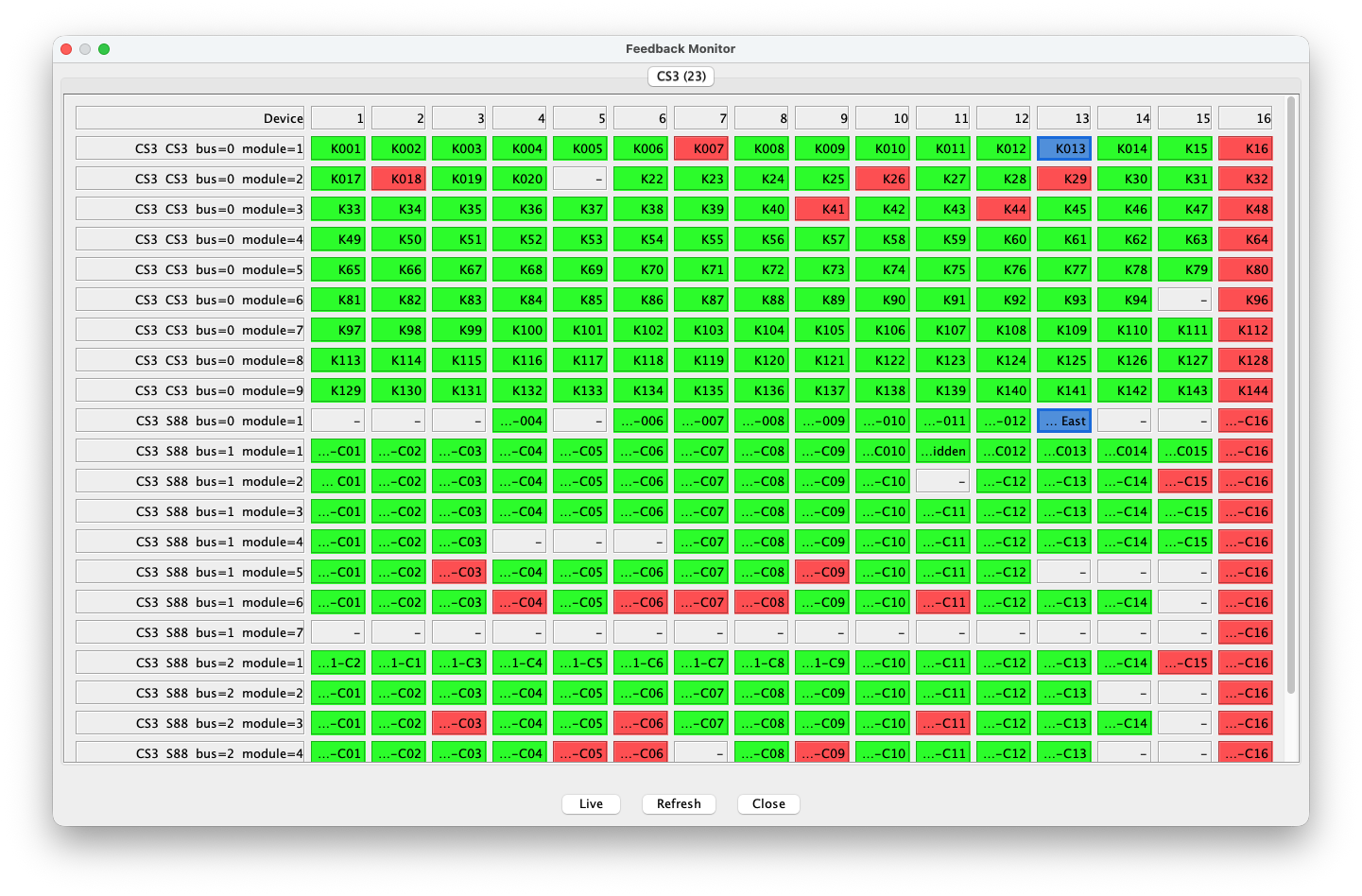
フィードバックモニターは、コマンドステーションごとに設定済みアドレス空間全体を表示します。各行は直接またはS88モジュール、各列は接点1~16です。「ライブ」は受信イベントを追跡し、「更新」は現在のプロジェクトとCS情報から再構築します。定義済みフィードバックをダブルクリックすると編集できます。
モニターの色
緑は定義済みフィードバックが空き、赤は在線を意味します。灰色はその物理アドレスにプロジェクト定義がありません。太い青枠は有効なアクション規則で使用中、空き時の青い塗りはアクション用フィードバックを示します。空き色と在線色は設定で変更できます。
ライブとライブ:RAW
「ライブ」は定義済みフィードバックの処理後状態変化を一覧表示します。「ライブ:RAW」は通常のフィルタリングや抑制前のすべての生イベントを表示する診断画面です。RAW開始時に色とカウンターをリセットし、受信するたびに正確なステーション、接続元、バス、モジュール、接点のカウンターを増やします。回数が増えるほど赤が濃くなり、不安定な入力、配線障害、繰返しバストラフィックを可視化します。両モードは同時に使えません。
下の例の数値はイベント回数であり、アドレスや在線値ではありません。正常で静かな接点は無色のままです。同じS88領域に集中する赤いパターンから、異常トラフィックの場所がすぐ分かります。接点、モジュール、バスを比較すると、単一入力の故障か共有モジュール、ケーブル、電源、バスの問題かを切り分けられます。

CS3フィードバックバス長
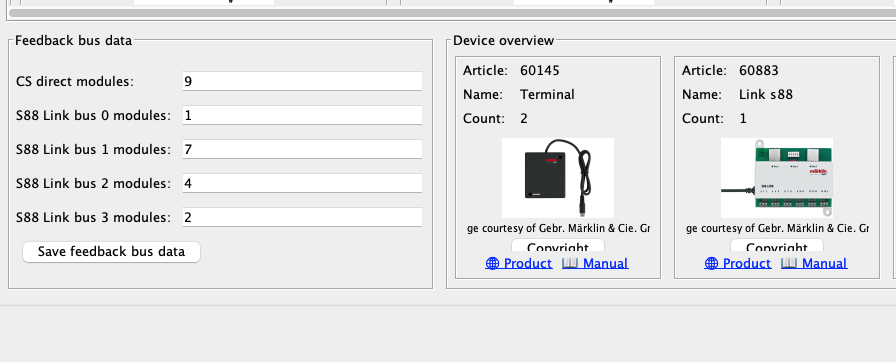
CS3概要左下のフィードバックバスデータには3列あります。「Defined」はRailKernelに保存した直接接続とS88 Linkモジュール数、「Configured」はそのCS3から読んだ値、「Calculated」は読込み済みレイアウトの定義から必要数を計算した値です。設定不足や、誤ったステーションまたはバスへの割当を見つける助けになります。RailKernelはCS定義を無断で変更せず、作成、削除、同期には常に明示的な承認が必要です。