
Pomoc
Lokomotywy
Lokomotywa jest indywidualnie adresowanym, napędzanym pojazdem kolejowym, którym RailKernel steruje za pośrednictwem centrali.
Lokomotywy w RailKernel i centralach
Centrala zna dane potrzebne do jazdy: wewnętrzną tożsamość, protokół, adres dekodera, liczbę kroków prędkości i funkcje. RailKernel importuje tę tożsamość operacyjną i dodaje informacje projektu ponad warstwą protokołu, takie jak centrala właścicielska, producent, numer katalogowy, długość fizyczna, typ lokomotywy, szablon funkcji, obraz i komentarze. Lokomotywa może więc istnieć w centrali przed utworzeniem jej w projekcie. Import tworzy definicję RailKernel; nie duplikuje ani nie rejestruje ponownie dekodera. Gdy centrala obsługuje zapis danych lokomotyw, przesyłanie i utrzymanie jej bazy są dostępne przez okno Centrale, a nie edytor projektu.
Importowanie lokomotyw
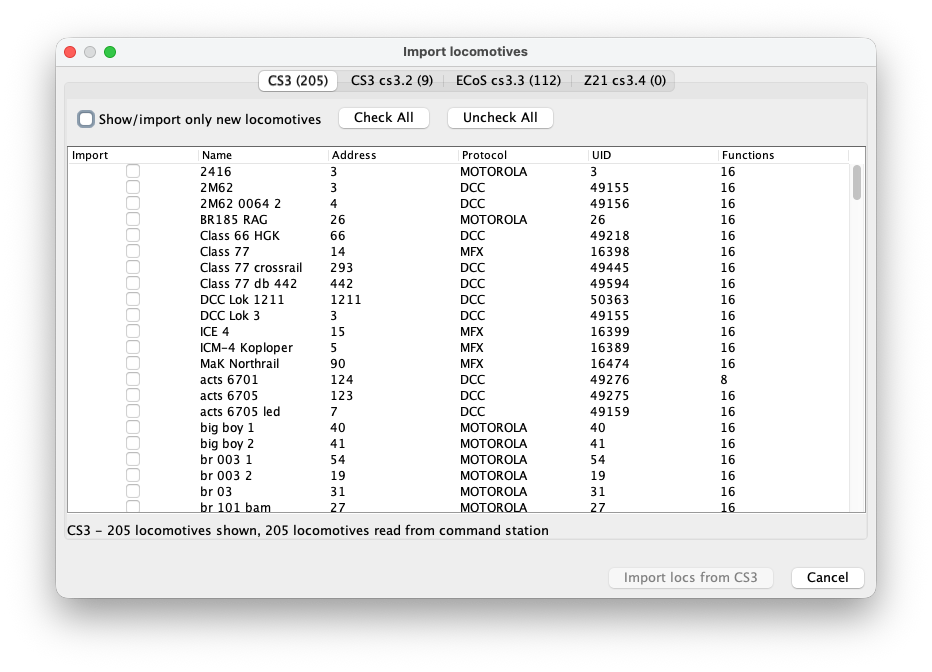
Otwórz polecenie importu lokomotyw z menu. RailKernel odczytuje dostępne listy ze wszystkich podłączonych central i tworzy dla każdej osobną kartę. Tabela pokazuje, czy wpis zostanie zaimportowany, oraz jego nazwę, adres, protokół, UID i liczbę funkcji. Tytuł karty i stopka pokazują liczbę odczytanych oraz wyświetlanych wpisów.
Wybór danych do importu
Zaznacz pojedyncze pola, jeśli do projektu należą tylko wybrane lokomotywy. Zaznacz wszystko wybiera wszystkie widoczne wiersze możliwe do importu, a Odznacz wszystko je czyści. Pokaż/importuj tylko nowe ukrywa wpisy już rozpoznawane przez RailKernel; wyłącz tę opcję, aby porównać pełną listę centrali. Istniejące kombinacje adresu i protokołu oraz rekordy trakcji lub zestawów, które nie są zwykłymi lokomotywami, są chronione przed duplikacją. Naciśnij Importuj lokomotywy z wybranej centrali, a następnie powtórz czynność na innych kartach.
Menedżer lokomotyw
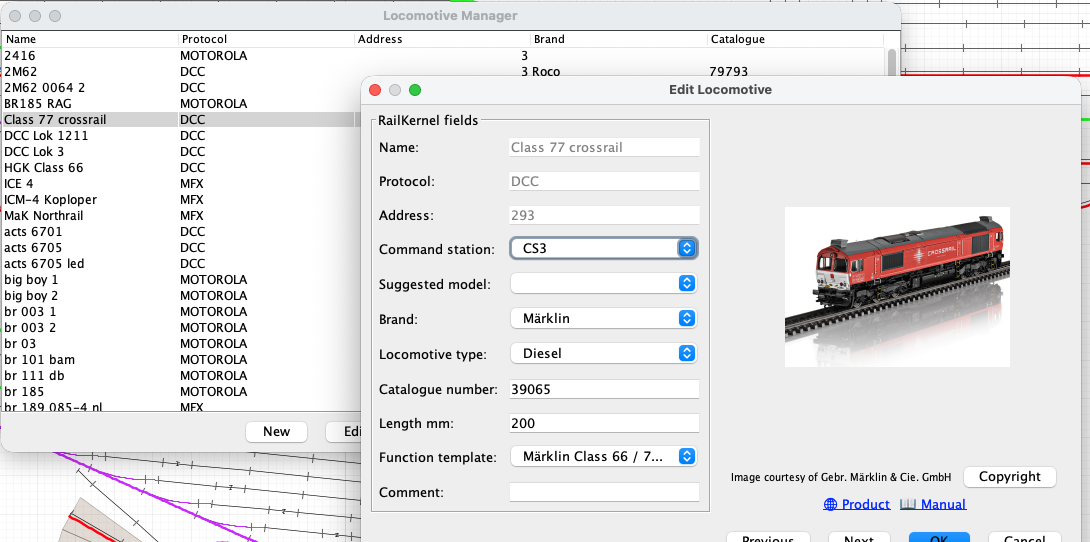
Otwórz Lokomotywy z menu, aby zobaczyć listę projektu. Tabelę można sortować i filtrować; pokazuje tożsamość operacyjną, markę i numer katalogowy. Nowa tworzy lokomotywę ręcznie, Edytuj otwiera definicję, Steruj otwiera bezpośrednie sterowanie, a Usuń usuwa wpisy projektu. Poprzednia i Następna w edytorze pozwalają przeglądać listę bez ciągłego powrotu do tabeli.
Szczegóły lokomotywy
- Nazwa
- Nazwa centrali lub projektu używana w całym RailKernel. Dla importowanych lokomotyw ta tożsamość jest tylko do odczytu. Znacząca nazwa pomaga także funkcji Sugerowany model.
- Protokół
- Protokół dekodera, na przykład DCC, MFX lub Motorola. Razem z adresem i centralą określa sposób wysyłania poleceń jazdy i funkcji.
- Adres
- Adres dekodera używany przez wybraną centralę. Importowane wartości pochodzą z centrali i nie są przypadkowo przepisywane podczas edycji metadanych RailKernel.
- Centrala
- Skonfigurowana centrala odpowiedzialna za lokomotywę. Wszystkie polecenia prędkości, kierunku i funkcji są kierowane do tego połączenia.
- Sugerowany model
- Zapytanie wspomagane przez AI w RailKernel Cloud przeszukuje bazę modeli RailKernel pod kątem produktów pasujących do nazwy. Wybór wyniku uzupełnia dostępne dane marki, numeru, długości i typu oraz odświeża obraz. Sugestie są kandydatami, a nie dowodem — zawsze sprawdź model.
- Marka
- Producent lub dostawca. Razem z numerem katalogowym łączy lokomotywę z obrazami RailKernel Cloud, stronami produktów, instrukcjami i informacjami o prawach autorskich.
- Typ lokomotywy
- Kategoria trakcji, na przykład parowa, spalinowa, elektryczna lub inna. Wybrany model RMDB może zasugerować tę wartość.
- Numer katalogowy
- Numer artykułu producenta fizycznego modelu. Dokładna wartość jest niezbędna do uzyskania właściwego obrazu i dokumentacji.
- Długość mm
- Fizyczna długość modelu w milimetrach. RailKernel używa jej podczas umieszczania i śledzenia taboru w blokach oraz sprawdzania, czy pociąg się mieści.
- Szablon funkcji
- Mapuje numery funkcji dekodera na spójne nazwy, ikony i zachowanie odpowiednie dla modelu lub rodziny dekoderów.
- Komentarz
- Dowolne notatki o lokomotywie, dekoderze, konserwacji, własności lub ograniczeniach operacyjnych.
Sugerowany model wymaga użytecznej nazwy
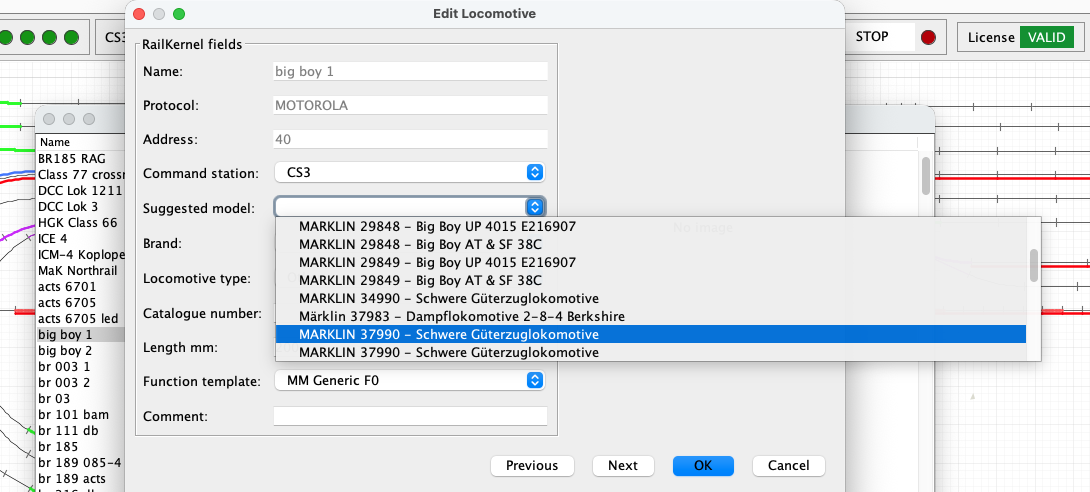
Wyszukiwanie w chmurze wyodrębnia z nazwy znaczące słowa i liczby przypominające numery katalogowe. Ogólna nazwa, taka jak „lokomotywa1”, nie mówi nic o pierwowzorze ani produkcie i raczej nie da dobrego wyniku. Nazwy takie jak „ns1215” lub „big boy 1” zawierają rozpoznawalne informacje i mogą zwrócić odpowiednich kandydatów. Przykład poniżej pokazuje kilka modeli Big Boy znalezionych z prostej nazwy „big boy 1”. Wybierz konkretny produkt tylko wtedy, gdy odpowiada posiadanej lokomotywie.
Calibrate and review a locomotive
The Calibrate and Calibration buttons in the locomotive definition record the real driving behaviour of the selected locomotive. RailKernel stores the measurements with the locomotive and can use them to translate decoder speed steps into realistic movement and stopping behaviour.
Calibrate
Calibrate opens the guided measurement run. Place the locomotive on the centre feedback B. RailKernel follows the connected track in both directions, respecting the current turnout positions, and lists every reachable feedback on each side with its geometrical OCCUPIED-to-OCCUPIED distance from the entry of B. Select A and C far enough away to provide sufficient measuring and braking distance. Calibration times only new OCCUPIED transitions reported for B and A/C. It never uses a FREE transition as a physical measuring or stopping reference, so release delays in RailKernel, the command station or the feedback module cannot distort the result. Then choose the decoder speed steps and directions to measure.
- RailKernel first positions the locomotive from B in reverse. It commands speed zero as soon as the first outer feedback A or C becomes occupied, so that the actual measurements can start in the forward direction.
- The selected speed steps are measured from high to low. For every run, timing starts when centre feedback B becomes occupied and stops when destination feedback A or C becomes occupied. Because the same leading detecting axle causes both transitions, the measured geometry runs from the entry of B to the entry of A/C.
- At that destination OCCUPIED transition RailKernel immediately commands speed zero. It does not wait for the feedback to become free.
- Once the locomotive has stopped, enter the braking distance from the beginning of the destination feedback to the leading detecting axle. Alternatively click the rail at the rear conducting axle; RailKernel adds the configured detection length, calculated from locomotive length and its front and rear detection overhang.
- When both directions are selected, RailKernel measures the same speed step in the return direction before continuing with the next lower step.
- You may cancel a long calibration run. RailKernel then asks whether the measurements collected so far must be saved. Repeating a measurement replaces the existing value for the same speed step and direction.
Calibration
Calibration opens the stored measurements without starting the locomotive. Each row shows the decoder speed step, direction, measured distance and time, speed in millimetres per second, calculated scale speed, the speed related to the locomotive’s configured maximum speed, and braking distance.
- If this locomotive has no measurements, select another calibrated locomotive and press Copy. RailKernel copies its calibration data to the current locomotive, after which the copy can be changed independently.
- Select one or more measurement rows to display Delete selected measurements. This removes only the selected speed-step and direction combinations.
- Green speed-step selections in the Calibrate dialog indicate measurements that already exist. A new run for such a selection updates the stored measurement.
- Start from scratch removes all existing measurement points when the actual measurement sequence begins after the positioning run. Without this option, only remeasured speed-step and direction combinations are replaced and all other points remain available.
- Measurements from an older FREE-based distance model are removed when this calibration is opened, because they cannot safely be mixed with OCCUPIED-to-OCCUPIED measurements.
From km/h to decoder speed steps
RailKernel uses the locomotive calibration as its base speed model. The measured curve relates decoder speed step and direction to actual movement in millimetres per second and to braking distance. The highest usable measurement is linked to the locomotive’s configured maximum speed; intermediate km/h values are interpolated over the measured, non-linear curve. The displayed km/h value is therefore a practical operating scale rather than a claim of laboratory-grade scale-speed accuracy.
Use while driving, braking and stopping
Manual km/h control and automatic routing use the same direction-dependent locomotive curve. A requested route speed is converted into the appropriate decoder step for forward or reverse running. When approaching a configured stop position, RailKernel combines the interpolated speed in mm/s with the measured braking distance to determine where the speed-zero command must be sent. Train-type acceleration and braking factors can still modify the result.
Train calibration as a load correction
Locomotive calibration describes the locomotive itself. Optional train calibration remains useful for measuring how a particular consist changes that behaviour through its mass, length, rolling resistance and vehicles. It samples only four operating speeds—50, 70, 90 and 110 km/h—and acts as a correction layer on top of the detailed locomotive curve, rather than as a competing speed model. Values between these points can be interpolated.
The calculation order is: requested km/h → direction-dependent locomotive curve → decoder step and base braking distance → optional train correction. If usable locomotive measurements are unavailable, RailKernel falls back to the existing train calibration and feedback/stop-position behaviour.