
Help
Emergency Stop and Recovery
Emergency Stop protects a railway when the observed physical movement no longer matches the routes, reservations and train positions RailKernel believes to be safe.
Why Emergency Stop exists
During automatic driving RailKernel knows which blocks contain trains, which blocks and accessories are reserved, and which feedback contacts belong to those protected areas. If a feedback changes from FREE to OCCUPIED outside an occupied or reserved block, RailKernel can no longer prove that continued movement is collision-free. The cause may be a train entering an unexpected section, a manually moved locomotive, a rolling wagon, a train placed without telling RailKernel, an incorrect address or a false feedback event. Stopping first is safer than guessing.
What RailKernel does
- It immediately sends STOP so the connected railway should stand still before the operator makes a decision.
- It identifies the unexpected feedback and, where possible, the block involved.
- It suspends further automatic movement while displaying the Emergency Stop Confirmation.
- It keeps the current route, reservation and train-placement state intact during this initial hold.
The Emergency Stop Confirmation
The dialog names the unexpected block and feedback and offers two deliberately different responses. Do not choose automatically: first inspect the railway and establish what actually happened.
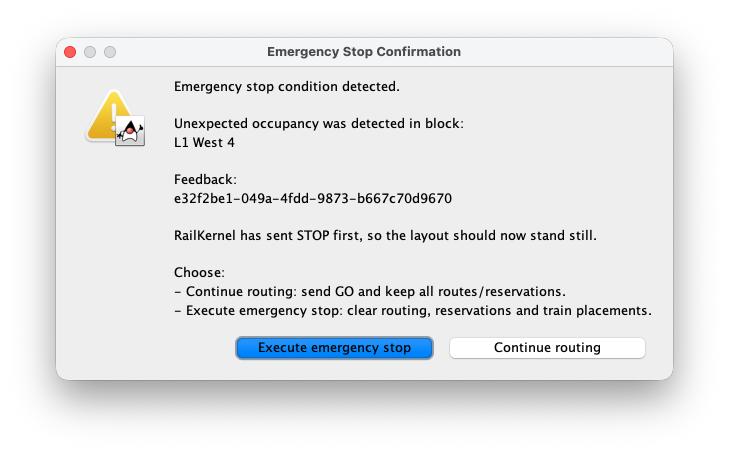
Continue routing — you do not have to start again
This is the important recovery path. If the physical trains still match their blue canvas positions and the unexpected condition can be corrected without invalidating the routes, fix the problem first and then choose Continue routing. RailKernel sends GO and retains train placements, active routes, reservations and running sessions. Automatic operation can therefore continue from the existing situation: you do not need to put every train back at its original starting block, place them all again and rebuild every route.
Before continuing, verify all of the following
- The reason for the unexpected feedback is understood and has been corrected.
- Every physical train is still in the block and direction shown by RailKernel.
- No wagon or locomotive is standing outside its represented train length or protected corridor.
- The reported feedback now represents the real occupancy correctly.
- Turnouts and other accessories on active routes have not been moved to conflicting positions.
- It is safe to restore track power and allow every active train to resume.
Execute emergency stop — discard the operational state
Choose Execute emergency stop when train positions are no longer trustworthy, a derailment or collision has occurred, rolling stock was moved manually, or you cannot confidently explain the feedback. RailKernel then performs a full operational reset: moving trains are stopped, train placements are removed, corridors and reservations are released, and pending, paused and dwell sessions are cleared. You must correct the railway, place the trains again and start new movements. This costs more work, but it is the correct choice whenever preserving the old state would be unsafe.
Manual and action-rule stops
An operator can request an emergency stop from Train Monitor, and an action rule can stop all connected command stations when a physical emergency button or another event is triggered. These are intentional stop requests rather than the recoverable unexpected-occupancy hold described above. Treat the railway as unsafe until the cause is known. A deliberate full stop may clear operational state because RailKernel cannot assume that the physical situation remained unchanged.
Keep protection enabled
Emergency Stop protection is controlled from the toolbar. Enabled is the recommended normal operating mode. Disabling it prevents RailKernel from reacting to unexpected occupancy and removes an important safety layer; use that only for deliberate testing or troubleshooting while directly supervising the complete railway. Software protection complements careful operation but cannot prevent every hardware failure, derailment or wiring fault.
If Emergency Stop happens repeatedly
Do not simply keep pressing Continue routing. Use the reported feedback and block, Feedback Monitor, Train Monitor and driving log to find the pattern. Check feedback polarity and stability, addresses and bus assignment, block membership, physical train length, rolling stock that can bridge or leave a detector, unreliable accessories, route direction and any action rule tied to that feedback. Repeated emergency stops normally indicate a reproducible difference between project state and physical state.