
Help
Train Monitor
Train Monitor is the operational control room for every Simple Move and Route Move that is running, queued, dwelling, paused or still protecting reserved infrastructure.
Open Train Monitor
Open Train Monitor from the Drive menu. The modeless window refreshes automatically and can remain beside the layout while trains operate. It contains only trains with an active operational state; an ordinary placed train with no movement, queue, pause, dwell or reservation does not need a row. The title reports the number of monitored trains and how many movements are queued.
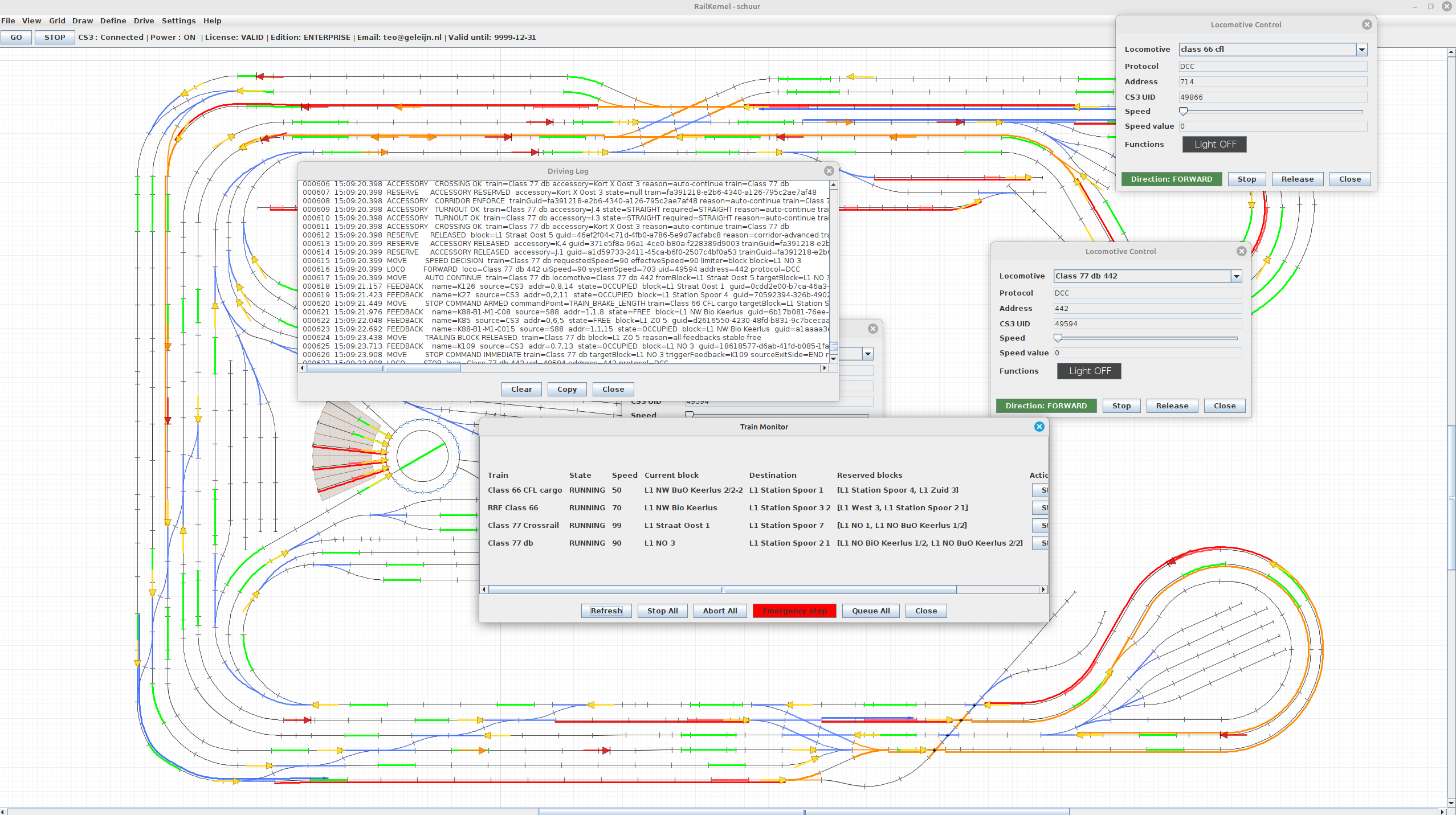
What every row shows
- Train
- The Simple Train name. Hover over it for detailed operational data, or double-click it to open the complete debug view for that train.
- State
- The current phase, such as RUNNING, QUEUED, RESERVED, a station DWELL or PAUSED with its reason. STOP REQUESTED is appended when a cyclic movement has been asked to finish safely. Hover where available for the exact pause explanation.
- Speed
- The current or remembered RailKernel speed command. Actual movement remains subject to block limits and the train’s calibrated behaviour.
- Current block
- The block from which the current movement phase is being administered. This follows the train as feedback events advance its digital position.
- Destination
- The final destination selected in Simple Move or Route Move. Its tooltip shows the remaining route where that information is available.
- Reserved blocks
- The forward corridor currently protected for the train. These blocks, and their required accessories, cannot simultaneously be claimed by another movement.
- Actions
- Buttons whose availability depends on the state of this particular train. Disabled buttons are intentionally inapplicable to the current phase.
Queue from Simple Move and Route Move
Both movement dialogs offer Queue instead of Run. Queue records the train, source block, destination, direction, speed and route information without immediately reserving blocks, switching accessories or driving the locomotive. The movement appears as QUEUED in Train Monitor and is persisted with the project. This lets you prepare several departures, inspect them together and release them in a controlled sequence instead of racing through several dialogs while trains are already moving.
Starting queued trains
Use Start on one row to start only that queued train. RailKernel then rechecks the live situation and attempts to reserve its forward corridor before issuing any drive command. If that corridor cannot be obtained, the movement becomes paused rather than entering unsafe track. Start Queued starts all queued trains sequentially, one second apart, so they do not all request infrastructure and command-station traffic in the same instant.
Actions for one train
- Start
- Available for a QUEUED row. Starts that movement after fresh reservation and safety checks.
- Stop Cycle
- Requests an orderly end to the active cycle. A moving train continues to a controlled stopping point and then releases its route. For a queued, paused, dwelling or idle cycle, RailKernel can cancel and release it immediately. This is not an emergency stop.
- Abort
- Stops this train where possible and abandons its queued, running, paused, dwell, calibration and active-route state. Its corridors and accessory reservations are released. Use it when this individual operation must be cancelled rather than completed normally.
- Release
- Available when a paused train still holds protected blocks. It releases that stale protected corridor and immediately retries continuation from the train’s current block. Use it only after confirming that releasing those reservations is physically safe.
Controls for all monitored trains
- Refresh
- Immediately rebuilds the rows from the current runtime state. Normal display also refreshes automatically once per second, except while you are reading a tooltip.
- Stop All
- Requests Stop Cycle for every monitored train. This is a graceful operational stop: trains finish their current safe cycle or stop phase and release infrastructure normally.
- Abort All
- Aborts every monitored operation and releases their operational reservations. It is more disruptive than Stop All but remains distinct from the railway-wide Emergency Stop.
- Start Queued
- Appears when queued movements exist and starts them sequentially. Each train must still pass its own live corridor and command-station checks.
- Queue All
- Asks all active cyclic trains to continue to their final destination and become queued there. A train already in the appropriate station dwell can be queued immediately. This prepares a controlled common restart without discarding routes.
- Emergency Stop
- Performs the deliberate full emergency-stop operation described on the next help page. It is not equivalent to Stop All: train placements and operational state may be cleared because safety can no longer be assumed.
Paused is a safe state, not necessarily an error
A train pauses when RailKernel cannot reserve the next safe corridor, when another train occupies or protects required infrastructure, or when continuation cannot yet be proven. Read the state tooltip before intervening. Many pauses resolve automatically after feedback changes or another train releases its corridor. Release is intended for the narrower case where this paused train itself still holds reservations that should be relinquished and retried.
Stop, Abort and Emergency Stop are deliberately different
Use Stop Cycle when the train should finish safely and remain placed. Use Abort when one planned movement must be abandoned and its reservations released. Use Emergency Stop only when immediate railway-wide safety takes priority over preserving operational state. Choosing the least disruptive correct action is what allows RailKernel to keep the physical railway and its digital model synchronized.