
Help
Trains and Calibration
A Simple Train is deliberately simple: one locomotive plus the total physical length of the complete train.
Simple Trains
RailKernel drives trains rather than isolated decoder addresses. A Simple Train connects one project locomotive to the physical consist standing behind it. Its length includes the locomotive and all attached rolling stock, because block fitting, placement, release and stopping depend on the complete train. The name and type make it recognisable operationally; the essential composition remains one locomotive and one total length. If you change the wagons or materially change the load, update the length and consider recalibrating because the braking behaviour may also have changed.
The Simple Train Manager
Open Simple Trains from the menu. Add creates a train from an available locomotive, Edit opens the selected definition and Unplace removes its current canvas placement without deleting the train. A placed train must be unplaced before it can be deleted. The selected train in the example uses the Class 66 CFL Cargo locomotive and has a total length of 2000 mm.
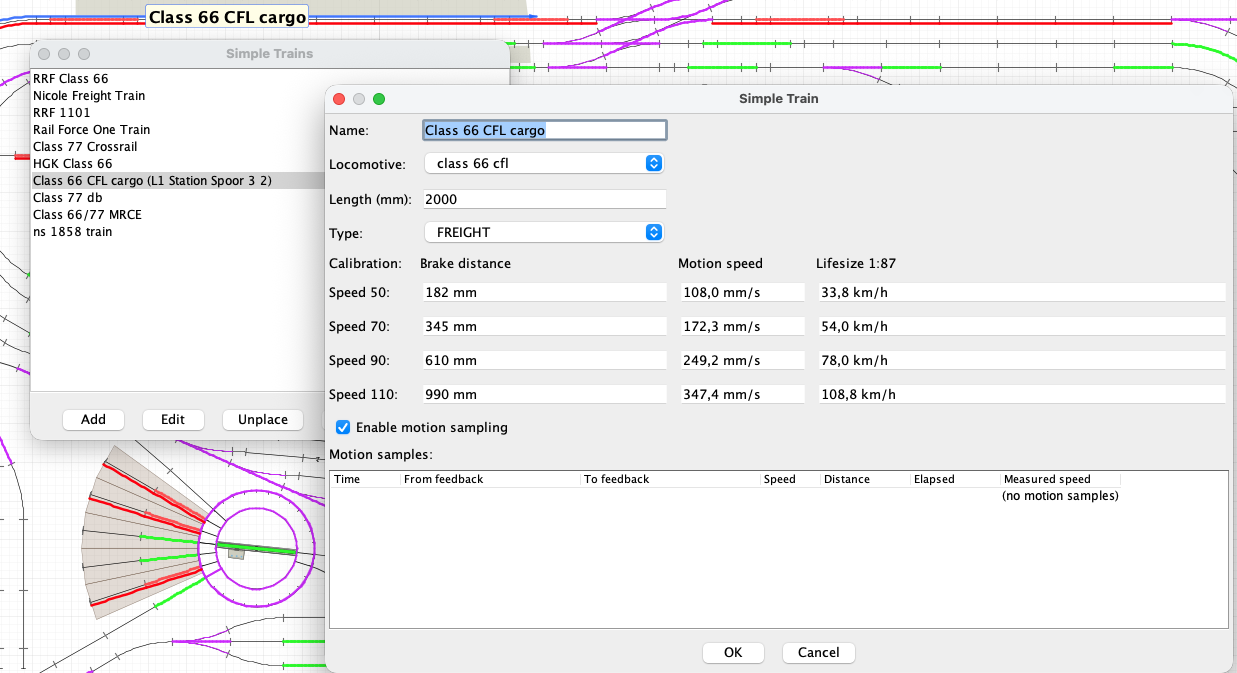
Basic train fields
- Name
- The operational train name shown on the canvas, in routes, monitors and driving logs.
- Locomotive
- The project locomotive that supplies the command station, protocol, address and functions used to move this train.
- Length (mm)
- The complete physical length of locomotive and rolling stock. RailKernel uses this when fitting, placing and releasing the train in blocks.
- Type
- An operational classification such as freight or passenger, used to describe the train independently from the locomotive type.
- Enable motion sampling
- Lets RailKernel collect valid timing samples between feedback contacts while the train runs. Sampling can later be disabled only after enough low-, medium- and high-speed measurements exist.
- Motion samples
- The measured runs behind the calculated speed values: time, source and destination feedback, commanded speed, distance, elapsed time and resulting model speed.
The eight calibration values
RailKernel stores two values for each commanded speed step 50, 70, 90 and 110:
- Brake distance 50 / 70 / 90 / 110
- The manually measured distance in millimetres from the beginning of the trigger feedback to the front axle after RailKernel commands the train to stop. These four values describe how the complete train brakes at increasing speeds.
- Motion speed 50 / 70 / 90 / 110
- The average real model speed in millimetres per second, calculated automatically from valid feedback-to-feedback distances and elapsed times recorded at each commanded speed.
During normal driving RailKernel interpolates between these four reference points. It can therefore estimate both distance travelled and braking distance at intermediate speeds instead of treating every locomotive and consist as if they behaved identically.
The life-size speed
The Life-size 1:87 column converts the measured H0 model speed to its full-size equivalent in km/h. It is a useful realism check: the Class 66 in the screenshot reaches about 108.8 km/h at speed 110. Reassuringly, that does not mean two tonnes of model railway are actually crossing the attic at motorway speed.
Why calibration belongs to the train
The same locomotive brakes differently when running alone, pulling a short passenger consist or hauling a long heavy freight train. That is why RailKernel stores calibration with the Simple Train, not with the locomotive. Recalibrate after a substantial change to the consist, drivetrain, decoder behaviour or speed curve. Calibration is also revisited in Routes and Automatic Driving because it is performed through a specially constrained cyclic route.
Prepare a calibration run
Place the train in a STATION block and start a Simple Move. Select the same block as destination and enable Brake Sampling (Calibration). The move cannot be queued. The resulting route must make a complete loop back to the start block, the station must have a positive dwell time, the driving direction must be determinable and all blocks in the loop must be at the same height. Use a clean, reliable loop with stable feedbacks and enough stopping room. Do not run other trains or manually operate the route while sampling is in progress.
Four laps, four brake measurements
RailKernel drives the cyclic route four times, first at speed 50, then 70, 90 and 110. On each lap it leaves the station, follows the reserved route and arms the sampling stop only after reaching the first target block. When it returns to the station trigger feedback, RailKernel stops the locomotive and asks how many millimetres the front axle has travelled past the beginning of that feedback. Measure carefully and enter the non-negative distance. The value is stored, the next speed is selected and the following lap starts.
Speed is measured automatically
While the four laps run, motion sampling measures known geometry between successive feedbacks and divides that distance by elapsed time. After the final lap RailKernel calculates the average measured speed for 50, 70, 90 and 110 and stores those four motion-speed values beside the four brake distances. The final dialog reports all eight results. If there are too few valid samples for a speed, its motion value remains not sampled and further ordinary running can continue collecting data.
Measure consistently
Always measure from the beginning of the station’s trigger feedback in the direction of travel to the front axle after the train has come to rest. Use the same physical reference on all four runs. Let the complete sequence finish without interruption; cancelling a measurement cancels the current calibration session. In normal circumstances one calibration is sufficient until the train composition or driving characteristics change.
After calibration
With the eight reference values RailKernel can convert commanded speed into estimated physical movement, begin braking at an appropriate distance and improve station stops. Exact geometry tells it where the train should be; feedbacks say where it actually is; calibration connects those two worlds with the measured behaviour of this specific train.