
Help
Locomotives
A locomotive is the individually addressable powered railway vehicle that RailKernel commands through a command station.
Locomotives in RailKernel and command stations
A command station knows the information required to drive a locomotive: its internal identity, protocol, decoder address, speed steps and functions. RailKernel imports that operational identity and adds project information needed above the protocol layer, such as the owning command station, manufacturer, catalogue number, physical length, locomotive type, function template, image and comments. A locomotive may therefore exist in the command station before it exists in the project. Importing creates the RailKernel definition; it does not duplicate or re-register the decoder. When a connected station supports writing locomotive data, upload and command-station database maintenance are available through Command Stations rather than this project editor.
Import locomotives
Open the locomotives import command from the menu. RailKernel reads the available locomotive roster from every connected command station and gives each station its own tab. The table shows whether an entry will be imported together with its name, address, protocol, UID and function count. The tab caption and footer show how many entries were read and displayed.
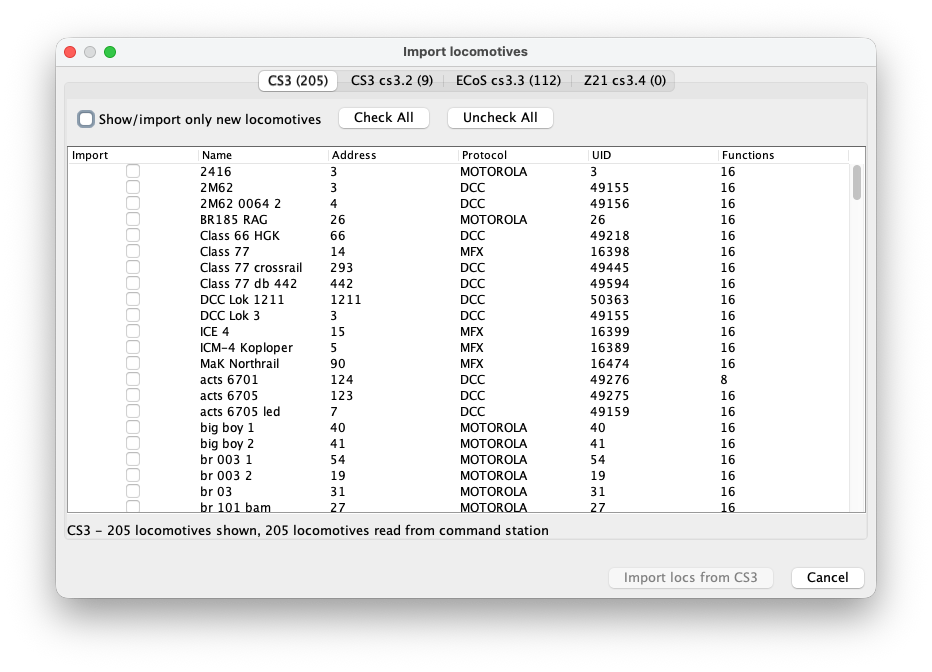
Select what to import
Select individual checkboxes when only certain locomotives belong in this project. Check All selects every currently visible importable row and Uncheck All clears them. Show/import only new locomotives hides entries that RailKernel already recognises; clear it when you need to compare the complete command-station roster. Existing address/protocol combinations and command-station traction or consist records that are not normal locomotive entries are protected from accidental duplication. Press Import locs from the selected command station to add the checked definitions. Repeat this on another tab when the project uses more than one station.
The Locomotive Manager
Open Locomotives from the menu to see the project roster. The table can be sorted and filtered and shows the operational identity together with brand and catalogue information. New creates a locomotive manually, Edit opens the selected definition, Control opens direct locomotive control and Delete removes selected project entries. Previous and Next in the editor let you inspect the roster without repeatedly returning to the table.
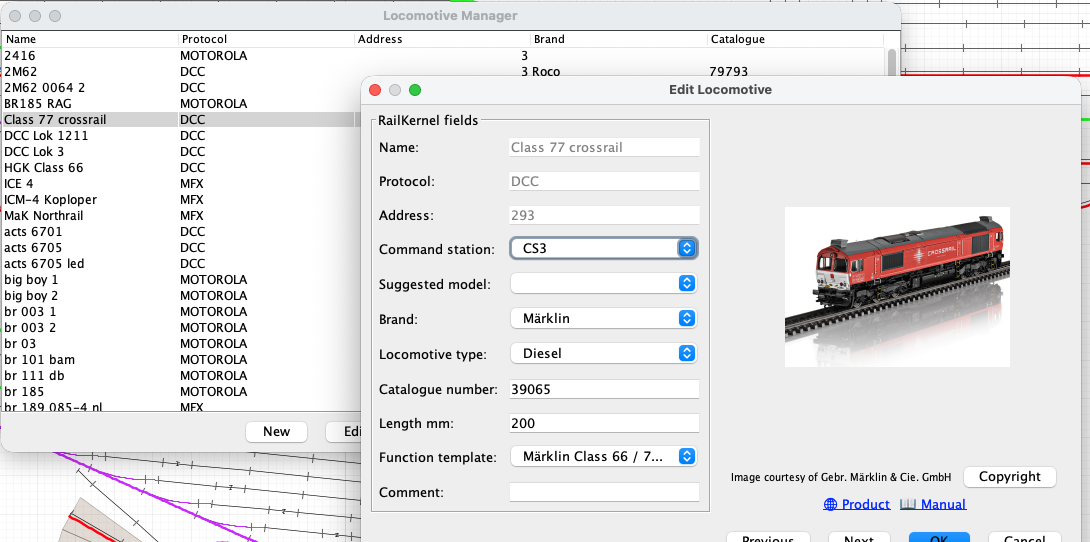
Locomotive details
- Name
- The command-station or project name used throughout RailKernel. For imported locomotives this operational identity remains read-only. A meaningful name also gives Suggested model enough information to search with.
- Protocol
- The decoder protocol, such as DCC, MFX or Motorola. Together with the address and command station it identifies how driving and function commands must be sent.
- Address
- The decoder address used by the selected command station. Imported protocol and address values originate from that station and are not casually rewritten by editing the RailKernel metadata.
- Command station
- The configured station responsible for this locomotive. All speed, direction and function commands are routed to that connection.
- Suggested model
- An AI-assisted query in RailKernel Cloud searches the RailKernel Model Database for products that may match the locomotive name. Selecting a result fills available brand, catalogue number, length and locomotive type data and refreshes the product image. Suggestions are candidates, not proof; always verify the chosen model.
- Brand
- The manufacturer or vendor. Together with the catalogue number it connects the locomotive to RailKernel Cloud images, product pages, manuals and copyright information.
- Locomotive type
- The traction category, for example steam, diesel, electric or other. A selected RMDB model can suggest this value.
- Catalogue number
- The manufacturer’s article number for the physical model. Accurate values are essential for the correct image and documentation.
- Length mm
- The physical model length in millimetres. RailKernel uses it when placing and following rolling stock inside blocks and when checking whether trains fit.
- Function template
- Maps decoder function numbers to consistent names, icons and behaviour appropriate to this model or decoder family.
- Comment
- Free notes about the locomotive, decoder, maintenance, ownership or operational restrictions.
Suggested Model needs a useful name
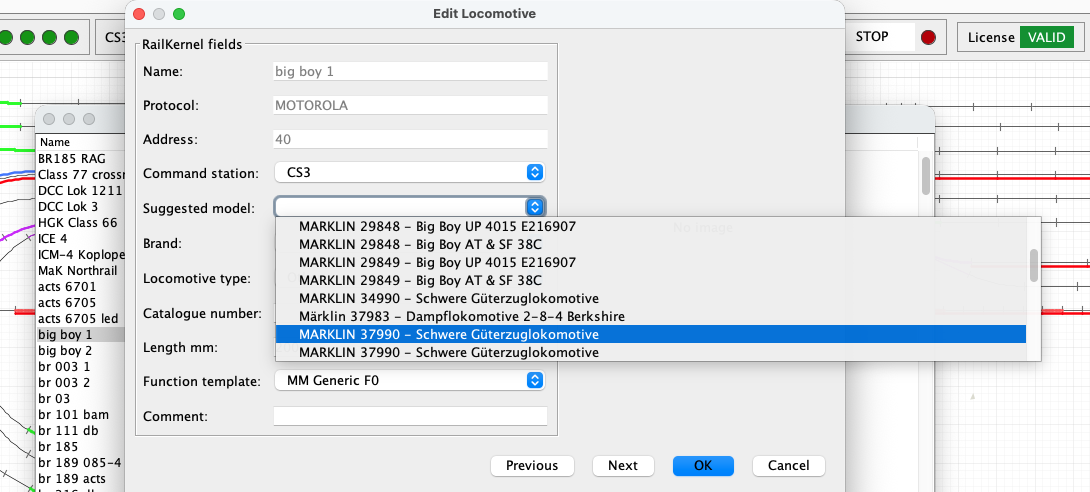
The cloud search extracts meaningful words and catalogue-like numbers from the name. A generic name such as “locomotive1” says nothing about the prototype or product and is unlikely to produce a useful match. Names such as “ns1215” or “big boy 1” contain recognisable railway information and can return relevant candidates. The example below shows multiple Big Boy models found from the simple name “big boy 1”. Choose the exact manufacturer and article only when it matches the locomotive you actually own.
Calibrate and review a locomotive
The Calibrate and Calibration buttons in the locomotive definition record the real driving behaviour of the selected locomotive. RailKernel stores the measurements with the locomotive and can use them to translate decoder speed steps into realistic movement and stopping behaviour.
Calibrate
Calibrate opens the guided measurement run. Place the locomotive on the centre feedback B. RailKernel follows the connected track in both directions, respecting the current turnout positions, and lists every reachable feedback on each side with its geometrical OCCUPIED-to-OCCUPIED distance from the entry of B. Select A and C far enough away to provide sufficient measuring and braking distance. Calibration times only new OCCUPIED transitions reported for B and A/C. It never uses a FREE transition as a physical measuring or stopping reference, so release delays in RailKernel, the command station or the feedback module cannot distort the result. Then choose the decoder speed steps and directions to measure.
- RailKernel first positions the locomotive from B in reverse. It commands speed zero as soon as the first outer feedback A or C becomes occupied, so that the actual measurements can start in the forward direction.
- The selected speed steps are measured from high to low. For every run, timing starts when centre feedback B becomes occupied and stops when destination feedback A or C becomes occupied. Because the same leading detecting axle causes both transitions, the measured geometry runs from the entry of B to the entry of A/C.
- At that destination OCCUPIED transition RailKernel immediately commands speed zero. It does not wait for the feedback to become free.
- Once the locomotive has stopped, enter the braking distance from the beginning of the destination feedback to the leading detecting axle. Alternatively click the rail at the rear conducting axle; RailKernel adds the configured detection length, calculated from locomotive length and its front and rear detection overhang.
- When both directions are selected, RailKernel measures the same speed step in the return direction before continuing with the next lower step.
- You may cancel a long calibration run. RailKernel then asks whether the measurements collected so far must be saved. Repeating a measurement replaces the existing value for the same speed step and direction.
Calibration
Calibration opens the stored measurements without starting the locomotive. Each row shows the decoder speed step, direction, measured distance and time, speed in millimetres per second, calculated scale speed, the speed related to the locomotive’s configured maximum speed, and braking distance.
- If this locomotive has no measurements, select another calibrated locomotive and press Copy. RailKernel copies its calibration data to the current locomotive, after which the copy can be changed independently.
- Select one or more measurement rows to display Delete selected measurements. This removes only the selected speed-step and direction combinations.
- Green speed-step selections in the Calibrate dialog indicate measurements that already exist. A new run for such a selection updates the stored measurement.
- Start from scratch removes all existing measurement points when the actual measurement sequence begins after the positioning run. Without this option, only remeasured speed-step and direction combinations are replaced and all other points remain available.
- Measurements from an older FREE-based distance model are removed when this calibration is opened, because they cannot safely be mixed with OCCUPIED-to-OCCUPIED measurements.
From km/h to decoder speed steps
RailKernel uses the locomotive calibration as its base speed model. The measured curve relates decoder speed step and direction to actual movement in millimetres per second and to braking distance. The highest usable measurement is linked to the locomotive’s configured maximum speed; intermediate km/h values are interpolated over the measured, non-linear curve. The displayed km/h value is therefore a practical operating scale rather than a claim of laboratory-grade scale-speed accuracy.
Use while driving, braking and stopping
Manual km/h control and automatic routing use the same direction-dependent locomotive curve. A requested route speed is converted into the appropriate decoder step for forward or reverse running. When approaching a configured stop position, RailKernel combines the interpolated speed in mm/s with the measured braking distance to determine where the speed-zero command must be sent. Train-type acceleration and braking factors can still modify the result.
Train calibration as a load correction
Locomotive calibration describes the locomotive itself. Optional train calibration remains useful for measuring how a particular consist changes that behaviour through its mass, length, rolling resistance and vehicles. It samples only four operating speeds—50, 70, 90 and 110 km/h—and acts as a correction layer on top of the detailed locomotive curve, rather than as a competing speed model. Values between these points can be interpolated.
The calculation order is: requested km/h → direction-dependent locomotive curve → decoder step and base braking distance → optional train correction. If usable locomotive measurements are unavailable, RailKernel falls back to the existing train calibration and feedback/stop-position behaviour.