
Help
Understanding Blocks
A block is a measurable, detectable section of track that RailKernel can protect and assign to a train.
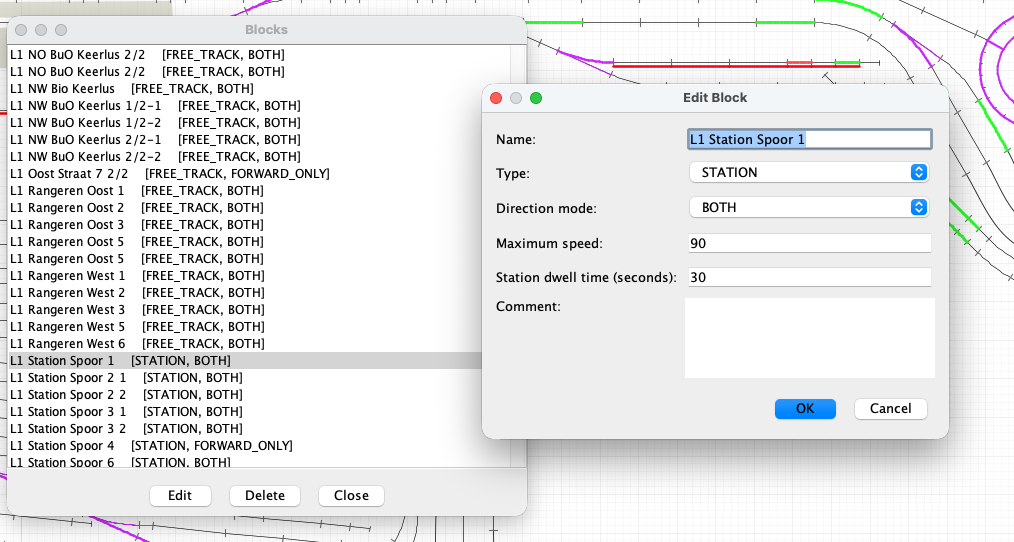
Edit a block
Open Define > Edit Blocks, select a block and choose Edit, or double-click its list entry. The list shows the name, type and permitted direction. Changes affect automatic operation as soon as the dialog is confirmed. A block used by a saved route cannot simply be deleted, because that would leave the route structurally invalid.
Block properties
- Name
- The operational name shown on the canvas, in routes, train monitors, logs and selection dialogs. Use a name that identifies the physical location unambiguously.
- Type
- FREE_TRACK is an ordinary running section. STATION is a stopping location and activates station dwell behaviour. SIDING describes a siding or yard track intended for storage or special movements.
- Direction mode
- BOTH permits trains to traverse the block in either direction. FORWARD_ONLY permits only the geometric block direction. The direction can be displayed on the canvas and flipped from the block context menu when its start and end are reversed.
- Maximum speed
- An optional whole-number speed limit for this block. Automatic driving must not command a train above this value, making it useful for stations, curves, yards and restricted track. Leave it empty when no block-specific limit is required.
- Station dwell time
- The number of seconds an automatically driven train waits in a STATION block before it may continue. Use zero for no scheduled dwell. The value is stored with the block, so every train using that station receives the same basic stop time.
- Comment
- Free notes about the location, operational purpose, restrictions, maintenance or anything another operator should know.
What belongs to a block
A block contains an ordered set of connected track elements and one or more feedbacks. Its geometry supplies the physical length and the forward direction. Feedback positions inside that ordered geometry tell RailKernel how far a train has progressed. Stop and brake positions can be defined for both directions without changing the underlying track. Rails and accessories between blocks remain route geometry rather than being forced into an undetectable block.
Free, reserved and occupied
The canvas turns the block model into an immediately readable operating display. By default the three main states are:
- Free — green
- No feedback in the block reports occupancy and no train currently owns it. The block is a candidate for a new reservation, subject to direction, route and other safety checks.
- Reserved — orange
- A train has claimed the block as part of its protected corridor, but it has not necessarily entered yet. Other trains cannot reserve or enter it. Accessories leading through that corridor are reserved with their required states.
- Occupied — red
- A feedback or train placement says that rolling stock is physically in the block. The block is unavailable to every other train and remains protected until the complete train has left and the corresponding feedbacks return to free.
These are the standard colours; free, reserved and occupied block colours can all be changed in Settings. The same visual language is used on the main canvas and slice viewers so that the operational state remains recognisable throughout RailKernel.
Blocks in automatic driving
Before moving, RailKernel does more than check the next rail. It builds a reservation corridor ahead of the train, verifies that the required blocks are free, checks direction restrictions and claims the route’s accessories. Only after those reservations succeed are accessories switched and the train allowed to proceed. Keeping multiple blocks protected ahead provides room to stop safely and prevents two trains from entering the same conflict area.
Following the train through the block
Incoming feedback events move the operational picture from prediction to fact. They identify the train’s progress through the ordered block, support position and speed calculations and confirm arrival at stopping sections. When the rear of the train has cleared earlier feedbacks and the corridor rules allow it, blocks behind can be released while new blocks ahead are reserved. The protected corridor therefore moves with the train rather than locking an entire route forever.
Why the distinction matters
Free means available, not merely unoccupied; reserved means promised to one train; occupied means physically in use. Keeping these meanings separate lets RailKernel detect unexpected occupancy, reject conflicting movements and initiate emergency handling when reality no longer matches the reservation. Block direction, maximum speed, dwell time, feedback order and exact geometry then provide the information needed to drive and stop the train correctly inside that protected space.